
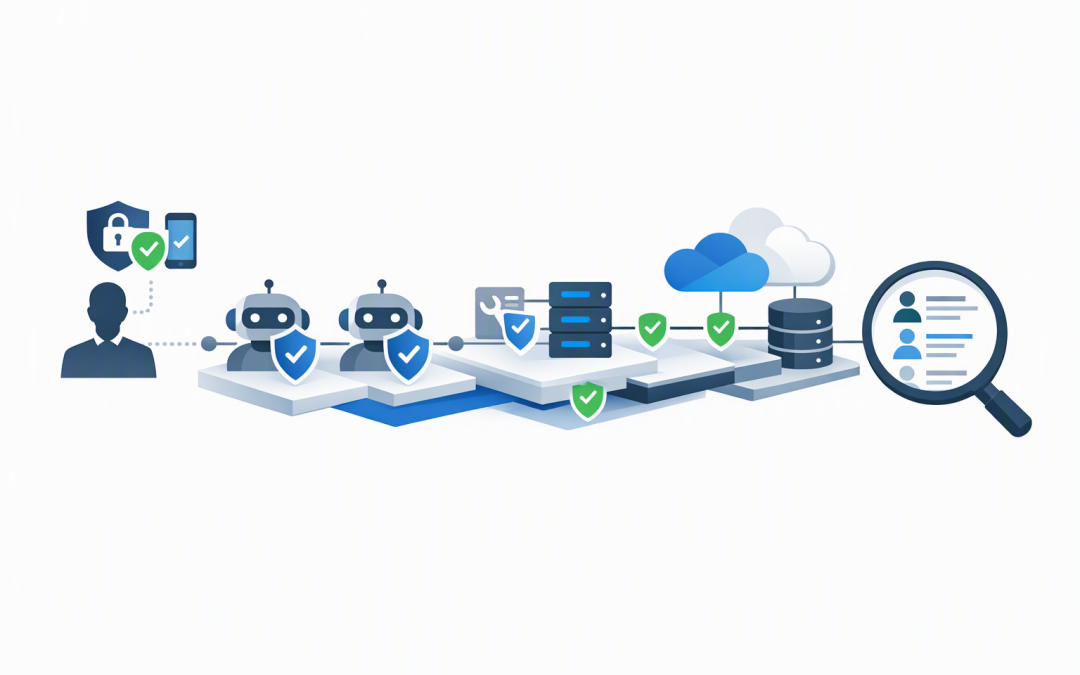
In this blog post The Identity at Every Hop Blueprint for Teams Copilot and Foundry we will explain how to give employees useful AI agents without creating invisible pathways into sensitive business systems.


The basic idea is simple. Every time a request moves from a person to an agent, another agent, a business application or a data source, identity must travel with it. Each step must confirm who is requesting access, what they are allowed to do and where the action will be recorded.
This matters because Teams and Microsoft 365 Copilot are increasingly becoming front doors to business processes. An employee may ask an agent to find a contract, summarise a customer account, update a service ticket or prepare a financial report without seeing how many systems sit behind that request.
The security problem hiding behind a simple chat
Imagine an employee asks an agent in Teams, “Show me the contracts due for renewal next quarter and draft emails for each account manager.” It sounds like one request, but it may involve five separate steps.
- Teams confirms the employee’s identity.
- The request is sent to the AI agent.
- The agent searches a document library or customer system.
- The agent sends information to an AI model for processing.
- The result is returned or an action is taken.
If identity is lost at any of these steps, the organisation may be relying on a shared connection with broad permissions. The agent could retrieve information the employee would not normally be allowed to see.
This is why securing the chat window alone is not enough. Teams may know who the user is, but the document system, customer database and downstream agent must also receive and respect the right identity.
What identity at every hop means
Identity at every hop means treating each connection in the agent workflow as a security checkpoint. Microsoft Entra ID, Microsoft’s system for managing user and application access, becomes the common identity layer across Teams, Copilot, Microsoft Foundry and connected services.
Microsoft Foundry is the managed platform used to build, run and control AI agents. An agent built in Foundry can have its own Microsoft Entra Agent ID rather than operating through a developer’s account or an anonymous shared credential.
That agent identity creates accountability. Your security team can see which agent requested access, which user initiated the request, what resource was involved and whether access was approved or denied.
We covered the foundations of this model in how Microsoft Entra Agent Identities secure AI agents. The next step is applying that identity consistently across the full journey.
The five layers of the blueprint
1. Confirm the person at the front door
The first identity is the employee using Teams or Copilot. Their sign-in should be protected with multifactor authentication, which requires an additional check beyond a password, and Conditional Access, which can block risky devices, locations or login behaviour.
This is also where Microsoft Intune, which manages and secures company devices, becomes important. A valid password should not be enough if the request comes from an unmanaged laptop with missing security updates.
The business outcome is straightforward: stolen credentials are less likely to become a pathway into company data.
2. Give every agent its own identity
An AI agent should not borrow an employee account, reuse a developer credential or share one powerful application identity with ten other agents. Each production agent needs an identity that reflects its specific role.
Microsoft Entra Agent ID supports identity blueprints, which are reusable templates for creating and governing agent identities. A blueprint can define ownership, authentication requirements and the permissions agents are expected to request.
This makes it easier to scale safely. Instead of inventing security rules for every new project, IT can approve patterns such as customer service agents, finance assistants and internal knowledge agents.
For more on moving beyond prototypes, see our guide to building controlled Microsoft Foundry agents.
3. Decide whether the agent acts for the user or itself
This is one of the most important design decisions. Some tasks should run on behalf of the signed-in employee, while others need the agent’s own limited service permissions.
If an employee asks an agent to find documents, the agent should normally inherit that employee’s access boundaries. A sales employee should not receive board papers simply because the agent’s search connection can read the entire document environment.
For scheduled tasks, such as checking overnight for expiring certificates, the agent may need to act independently. In that case, its own identity should receive only the minimum permissions required for that task.
Separating these two modes prevents a convenient agent from becoming an all-access account.
4. Recheck identity when the agent calls a tool
Agents become valuable when they can use tools. A tool might search Microsoft 365, query a customer system, create a support ticket or call another specialised agent.
Every tool call is another hop. The receiving system must verify the identity, check the requested permission and reject anything outside the approved scope.
Where possible, organisations should use short-lived Microsoft Entra tokens rather than permanent API keys. A token is a temporary digital pass that proves identity and permissions. Unlike a shared key stored in configuration files, it can be limited, monitored and allowed to expire.
This approach also applies to agent-to-agent workflows. A research agent should not automatically trust a finance agent merely because both were built in Microsoft Foundry.
5. Record the complete chain
Good identity design should answer four questions after any important action: who asked, which agent processed it, which system was accessed and what changed?
Logs from Microsoft Entra, Foundry and connected applications should be brought together for monitoring. Microsoft Defender, which detects suspicious activity across identities and devices, and Wiz, which identifies risks across cloud environments, can provide additional visibility.
This supports incident response and compliance reviews. It also helps organisations align AI controls with the Essential Eight, the Australian Government’s cybersecurity framework, particularly its focus on multifactor authentication and restricting administrative privileges.
Identity controls alone do not achieve Essential Eight compliance, but they reduce the chance that agents will bypass the protections already applied to employees.
A practical business scenario
Consider a 180-person professional services firm that introduces a Teams agent for project reporting. The first prototype uses one shared connection to read every project folder because it is quick to configure.
The agent works, but it can technically access acquisition documents, employee matters and restricted client records. Users may never intentionally request those files, yet one unclear prompt or software error could expose them.
Under the identity-at-every-hop blueprint, the employee signs in from a managed device, the reporting agent has its own identity, and document searches run using the employee’s existing permissions. The agent can draft a report but requires confirmation before sending it or updating a project system.
The firm keeps the productivity benefit while reducing the risk of an accidental disclosure. It also gains an audit trail showing who initiated each report and what information the agent accessed.
Questions to ask before an agent goes live
- Does the agent have a named business owner and a separate production identity?
- Can it access more information than the employee using it?
- Are user-driven and autonomous actions clearly separated?
- Does every connected tool verify identity and permissions?
- Are permanent API keys being used where managed identity could remove them?
- Can we trace an action from Teams or Copilot through to the final system?
- Is there a process to remove access when the agent is retired?
These checks should form part of the roadmap described in moving from Copilot Chat to governed AI agents. Governance is much easier to establish before dozens of agents reach production.
Secure agents without slowing useful work
The goal is not to place an approval meeting in front of every AI idea. It is to create repeatable identity patterns so useful agents can move into production without relying on excessive permissions, shared passwords or guesswork.
As a Microsoft Partner and Wiz Security Integrator with more than 20 years of enterprise IT experience, CloudProInc helps organisations connect Microsoft 365, Teams, Copilot, Microsoft Foundry, Defender and cloud security controls into one practical model. Our Melbourne-based team works hands-on with businesses across Australia and internationally rather than handing projects to a large, disconnected service desk.
If you are not sure whether your current agents preserve identity from the initial Teams request through to the final business action, we are happy to review the design and highlight the gaps — no strings attached.