
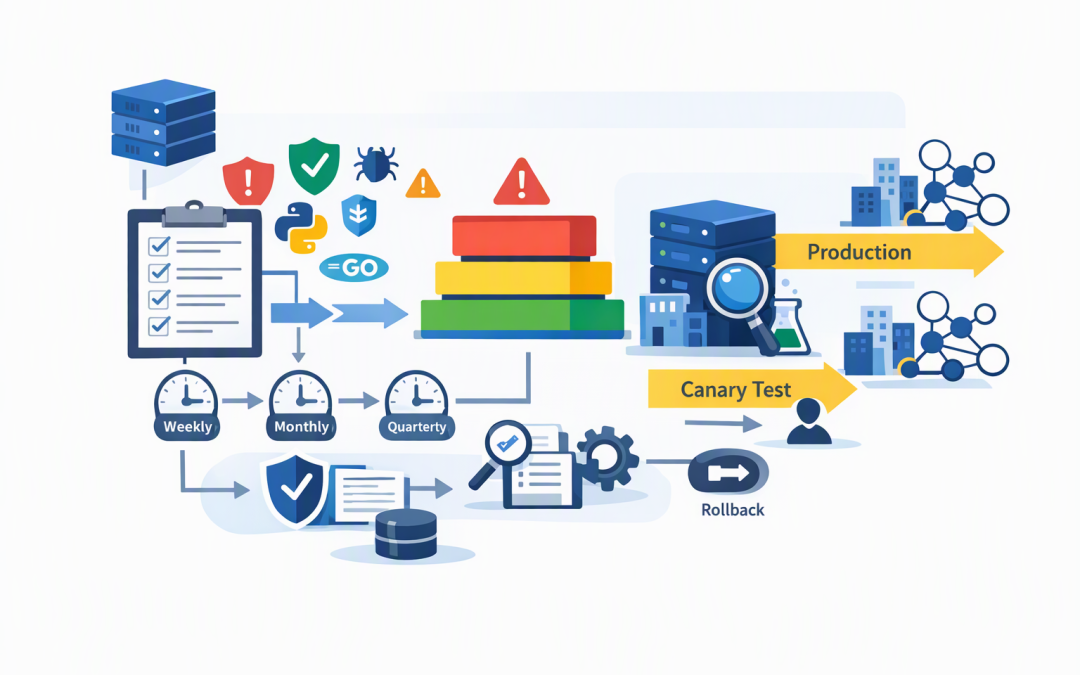
In this blog post Microsoft Agent Framework Release and Upgrade Governance Guide we will explain how to adopt frequent framework updates without turning every release into a production risk.
The problem is familiar. Your AI agent works today, a new framework version appears tomorrow, and the release notes promise useful security fixes and better controls. Your team must then choose between delaying improvements or upgrading quickly and potentially disrupting a business process.
Microsoft Agent Framework is the software foundation used to build and run AI agents and multi-agent workflows in Python, .NET and Go. In plain English, it connects an AI model to company data, business applications, approval steps and other agents so the system can complete work rather than simply answer questions.
The framework can support Microsoft Foundry, Azure OpenAI, OpenAI and other services. It also handles workflows, saved conversation state, human approvals, tool access and communication methods such as Agent-to-Agent, or A2A, and Model Context Protocol, or MCP.
CPI Consulting helps organisations design, build and secure Azure AI solutions, from Azure OpenAI and Microsoft Foundry to agents, governance and production deployment.
Visit CPI ConsultingThose moving parts are why an upgrade cannot be treated like an ordinary desktop application update. A small framework change can affect how an agent remembers work, calls a business system, handles an approval or resumes a task that started several hours earlier.
Why release speed creates a business problem
Microsoft Agent Framework is developing quickly. Python and .NET releases can arrive on separate schedules, and consecutive versions may be published within a short period.
This is positive for organisations that want better reliability, security and control. However, it also means that “always run the latest version” is not a sensible production policy on its own.
Recent releases have included changes affecting streamed responses, approval handling, stored sessions, provider-owned state and integration packages. Some hosting components also remain in prerelease, meaning Microsoft expects their design and behaviour to continue evolving.
The business risk is not limited to an agent being temporarily unavailable. An uncontrolled upgrade could cause an agent to repeat work, lose its place in a workflow, send incomplete information or use a business tool differently from the way users expect.
Our Python 1.21 and .NET 1.24 readiness guide covers recent technical changes. The governance question is broader: how should your organisation handle every release after that?
Use a release policy rather than reacting to notifications
A practical release policy separates monitoring from deployment. Your technical team can review releases every week without placing a new version into production every week.
For most organisations, we recommend four operating rhythms:
- Weekly release review to identify security fixes, breaking changes and features relevant to your agents.
- Monthly upgrade window for routine improvements that have passed testing.
- Quarterly baseline review to retire old versions, update documentation and check the full dependency set.
- Emergency upgrade path for serious security or reliability issues that cannot wait for the normal window.
This model gives the business predictable change windows while ensuring the technical team does not ignore important updates.
Classify each release by risk
Version numbers alone do not tell you whether an upgrade is safe. A minor-looking release can still change stored data, connector behaviour or the way an agent interprets a tool response.
Classify proposed upgrades into three groups:
- Low risk includes documentation, isolated bug fixes and changes to features you do not use.
- Medium risk includes provider updates, new model options, workflow improvements and changes to monitoring or streamed output.
- High risk includes breaking changes, identity changes, altered approval behaviour, session-format changes and updates affecting A2A or MCP connections.
High-risk changes need a named business owner, a rollback plan and testing against real business scenarios. If an accounts agent can create purchase orders, for example, the finance owner should approve the upgrade rather than leaving the decision entirely to developers.
For deeper governance of agent connections and tool access, see our production guide for A2A and MCP governance.
Pin every production dependency
Production systems should use approved, fixed package versions. This is called version pinning, which simply means the application installs the exact version you tested rather than automatically downloading a newer one.
Pin the core framework and its model providers, connectors, hosting packages, user interface components and protocol integrations. Python and .NET applications should also retain their dependency lock files, which record the complete set of supporting software used during testing.
Do not assume Python and .NET versions are equivalent because their numbers are similar. Treat them as separate products with separate release decisions.
A simple policy file might look like this:
agent_upgrade_policy:
 review_frequency: weekly
 routine_deployment_window: monthly
 production_auto_update: false
 require_business_owner: true
 require_security_review: true
 require_regression_tests: true
 require_rollback_plan: true
 pilot_percentage: 10
 observation_period_hours: 48
This is not application code. It is a clear, machine-readable record of the rules your delivery pipeline should enforce.
Test business outcomes rather than checking whether the agent starts
An agent successfully starting after an upgrade proves very little. Production testing should confirm that it still completes the work accurately, safely and within an acceptable time and cost.
Your test pack should include:
- The ten to twenty most common user requests.
- High-risk actions involving money, customer data or system changes.
- Human approval and rejection scenarios.
- Interrupted workflows that must resume later.
- Invalid, misleading and unusually long inputs.
- Attempts to access information the user should not see.
- Response quality, completion time and AI usage cost.
Keep the expected result for each test. Without that baseline, teams often approve an upgrade because the agent produced an answer, not because it produced the right answer.
Tracing, time limits and failure recovery are covered in more detail in how to operationalise Microsoft Agent Framework in production.
Protect saved sessions before upgrading
Long-running agents may save their progress so they can resume work after waiting for a person, another system or a scheduled event. Framework releases can change how that saved information is structured.
Do not run old and new workers against the same saved-session store unless compatibility has been confirmed. Once a new version rewrites stored information, returning to the old version may no longer be safe.
A safer approach is to create a separate production candidate environment with its own copy of the required data. Send a small percentage of suitable work to it, observe the results, and only then complete the rollout.
This is commonly called a canary deployment. The name is technical, but the idea is straightforward: expose a small, controlled group to the change before everyone depends on it.
A practical 200-person company scenario
Consider a 200-person professional services company using an agent to prepare client onboarding records. The agent reads submitted forms, checks Microsoft 365 documents and creates tasks for operations staff.
Automatically applying a framework update on Friday evening could appear efficient. But if the update changes session handling, partially completed onboardings might restart on Monday and create duplicate tasks.
Under a governed model, the company reviews the release first, runs fifty saved test cases, sends 10 per cent of new onboardings to the updated version and monitors it for 48 hours. The upgrade takes longer to approve, but the business avoids rework, client confusion and an emergency rollback.
Governance also supports Australian compliance
Upgrade records provide evidence that your organisation manages security changes deliberately. This supports the Essential Eight, the Australian Government’s cybersecurity framework that many organisations use to reduce common cyber risks, particularly its guidance around patching applications, controlling administration and maintaining reliable backups.
For agents handling personal information, the review should also check data storage, access permissions, logs and any changes to external model providers. An update does not automatically create compliance, but a documented approval and testing process makes your controls easier to demonstrate.
The outcome should be controlled progress
The goal is not to delay every Microsoft Agent Framework release. It is to gain useful security and reliability improvements without allowing package updates to dictate your business risk.
Assign an owner, monitor releases weekly, pin production versions, test real work and deploy changes gradually. That turns upgrades from urgent technical events into routine business decisions.
CloudProInc is a Melbourne-based Microsoft Partner and Wiz Security Integrator with more than 20 years of enterprise IT experience across Azure, Microsoft 365, AI and cybersecurity. We work hands-on with organisations that need practical controls rather than a large, faceless managed service.
If you are not sure whether your current agent release process provides enough protection, we are happy to review it and identify the gaps — no strings attached.