
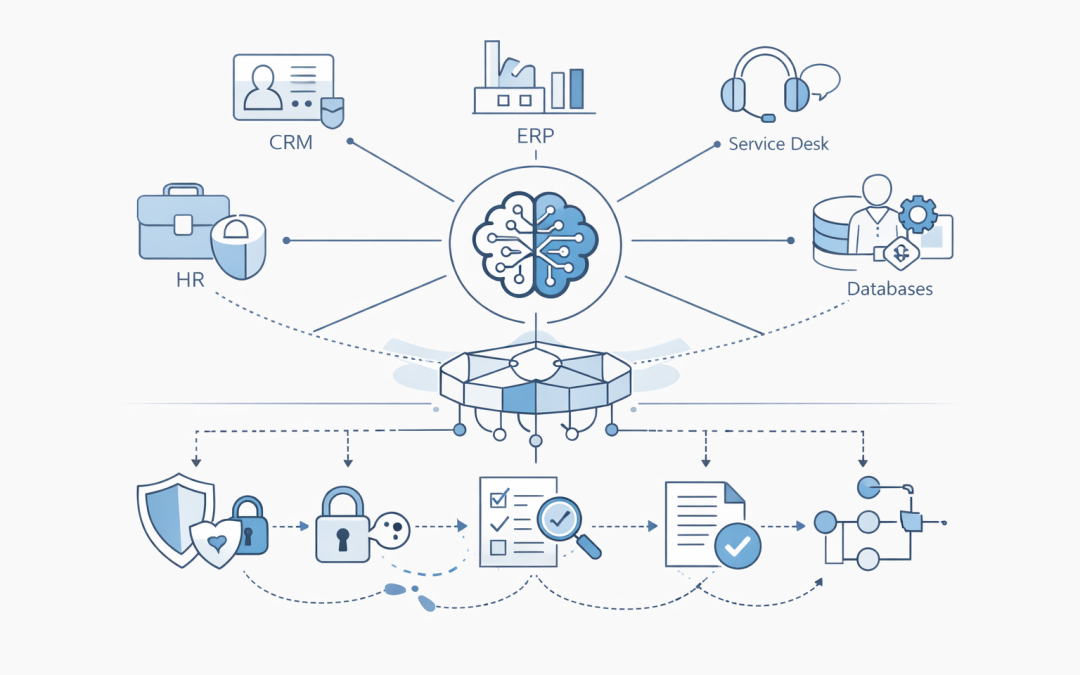
AI agents are moving from proof of concept to production planning. For many Australian organisations, the question is no longer whether an agent can answer a question. The harder question is whether it can safely do useful work across the systems the business already runs on.
That means connecting agents to CRMs, ERPs, service desks, finance platforms, HR systems, databases, document repositories, and custom line-of-business applications.
Microsoft Azure AI Foundry gives teams a practical platform for building and managing agents. But the real value appears when those agents are connected to trusted business systems with the right controls, approvals, logging, and security boundaries.
For CIOs, CTOs, IT managers, and business owners, this is where agent projects become business transformation projects.
Why system integration is the hard part
A standalone chatbot is relatively easy to demonstrate. A production agent that can check an order, raise a support ticket, summarise a contract, update a CRM record, or trigger an approval workflow is more complex.
The integration challenge usually comes down to five issues:
- Access control: What can the agent read, write, or change?
- Data quality: Which system is the source of truth?
- Process risk: What happens if the agent takes the wrong action?
- Auditability: Can the business explain what happened and why?
- Compliance: Does the design meet privacy, security, and governance obligations?
In Australia, these questions are especially important for organisations aligning with the Essential Eight, ACSC guidance, privacy requirements, sector regulations, and board-level cyber risk reporting.
The agent should not become a shortcut around governance. It should become a controlled interface into governed systems.
What Microsoft Foundry Agents can do
Azure AI Foundry Agent Service provides a managed way to build agents that can use tools, retrieve knowledge, call functions, and interact with external services. Instead of building every component from scratch, teams can define the agent, connect it to approved tools, and manage how it behaves.
In practical terms, a Foundry agent can:
- Answer questions using approved enterprise knowledge sources.
- Call APIs to retrieve or update business data.
- Trigger workflows through Azure Logic Apps or Azure Functions.
- Use OpenAPI-described services as callable tools.
- Connect to governed tool endpoints such as Model Context Protocol servers where appropriate.
- Apply instructions and guardrails that shape how it responds and acts.
The important design decision is not simply whether the agent can connect to a system. It is how that connection is exposed, secured, monitored, and limited.
Common integration patterns
There are several practical ways to connect Foundry agents to business systems. Most organisations will use more than one pattern.
1. Logic Apps as the integration layer
Azure Logic Apps is often the fastest way to connect agents to existing business systems. It provides managed connectors for many Microsoft and third-party platforms, along with workflow orchestration, approvals, branching logic, and error handling.
For example, a Foundry agent could trigger a Logic App to:
- Create or update a Dynamics 365 opportunity.
- Open a ServiceNow or Jira ticket.
- Send a Teams approval request.
- Query a SQL database through a controlled workflow.
- Start an onboarding process after HR approval.
- Notify finance when a customer risk threshold is exceeded.
This pattern is useful because the business process remains visible and manageable. The agent does not need direct access to every backend system. It calls a controlled workflow that IT can secure, test, version, and audit.
For many mid-market organisations, Logic Apps is the natural bridge between AI capability and operational reality.
2. OpenAPI tools for custom business applications
Many Australian businesses run custom applications or industry-specific platforms that do not have ready-made connectors. In those cases, OpenAPI is a practical integration approach.
A development team can expose selected business functions through a documented API, then make those actions available to the agent as tools. The agent can understand what each function does, what inputs are required, and when it should be used.
Examples include:
- Checking customer account status.
- Retrieving warranty or asset information.
- Creating a quote request.
- Looking up inventory availability.
- Updating a case note.
- Running an eligibility check.
The key is to expose only the actions the agent needs. A well-designed API boundary is safer than giving the agent broad database or application access.
3. Azure Functions for focused actions
Azure Functions is useful when the agent needs to run a small, focused piece of business logic. This might include validation, calculation, transformation, or integration with an internal service.
For example, an Azure Function might:
- Validate an Australian Business Number before a vendor is created.
- Calculate service priority based on customer tier and SLA.
- Normalise data before it is passed into a legacy system.
- Check whether a user is allowed to perform a requested action.
- Mask sensitive information before returning a response.
This pattern works well when teams want tight control over the code the agent can execute.
4. API Management for security and governance
When agents call APIs, Azure API Management can provide an important control plane. It can help enforce authentication, rate limits, request validation, logging, and policy-based access.
This matters because agents may generate more variable requests than traditional applications. API Management can help standardise how those requests are handled before they reach core systems.
Common controls include:
- Entra ID authentication.
- Managed identity access.
- Rate limiting and throttling.
- IP restrictions where appropriate.
- Request and response transformation.
- Centralised logging.
- Separation between test and production APIs.
For regulated or risk-conscious environments, this layer is often essential.
5. Model Context Protocol for governed tool access
Model Context Protocol, often shortened to MCP, is emerging as a standard way for AI applications and agents to discover and use tools. Rather than building one-off integrations for every agent, an organisation can expose a governed set of tools through an MCP server.
In a Microsoft environment, this can support a more reusable pattern for business system access. Instead of every project creating its own integration path, IT can publish approved tools that agents are allowed to use.
This approach is still evolving, but the governance idea is important:
- Make approved capabilities discoverable.
- Standardise how tools are described.
- Apply consistent authentication.
- Reduce duplicated integration work.
- Give security teams a clearer view of what agents can do.
For larger environments, this kind of tool catalogue can become an important part of agent governance.
A practical example: service management agent
Consider an IT service management use case.
An employee asks an internal agent: “My laptop is running out of storage and Teams keeps crashing. Can you help?”
A basic chatbot might provide generic troubleshooting steps. A connected Foundry agent could do more:
- Ask clarifying questions.
- Search approved knowledge articles.
- Check the user’s device record in Microsoft Intune.
- Review recent incidents from the service desk.
- Suggest safe remediation steps.
- Create a ticket if the issue cannot be resolved.
- Route the ticket based on priority, device type, and location.
- Notify the employee in Teams.
Behind the scenes, this could involve Microsoft Graph, Intune, Logic Apps, ServiceNow or Jira, Teams, and an internal knowledge base.
The agent is not replacing IT governance. It is improving the user experience across existing governed systems.
The security model matters more than the demo
Many agent demonstrations focus on capability. Production projects need to focus on control.
Before connecting agents to business systems, organisations should decide:
- Which systems can the agent access?
- Is access read-only, write-only, or read-write?
- Which actions require human approval?
- What data should never be sent to the model?
- How will prompts, tool calls, and outputs be logged?
- How will privileged actions be reviewed?
- How will incidents be investigated?
- Who owns the agent after deployment?
This is where alignment with the Essential Eight and ACSC guidance becomes practical. Controls such as multi-factor authentication, least privilege access, patching, application control, logging, backups, and administrative privilege management still apply.
An AI agent should not be treated as an exception to security architecture.
Data protection and privacy considerations
Agent integration also raises privacy questions. If an agent can access customer records, HR documents, contracts, emails, or financial data, the organisation needs clear rules for how that data is handled.
Important design principles include:
- Use the minimum data required to complete the task.
- Keep sensitive data inside approved Microsoft 365 or Azure boundaries where possible.
- Avoid exposing unnecessary fields through APIs.
- Apply role-based access control.
- Mask or redact sensitive information where appropriate.
- Log tool usage without over-collecting personal information.
- Test for accidental disclosure between users or departments.
For Australian organisations, privacy risk is not only a legal concern. It is a trust issue with customers, employees, suppliers, and partners.
Human approval is still important
Not every agent action should be automatic.
Low-risk tasks may be safe to automate, such as retrieving a policy document or creating a draft ticket. Higher-risk tasks should usually involve human approval, especially when they affect money, employment, security settings, legal obligations, or customer commitments.
Examples of actions that may need approval include:
- Issuing a refund.
- Changing customer credit terms.
- Disabling a user account.
- Approving supplier onboarding.
- Sending external legal correspondence.
- Updating production configuration.
- Releasing sensitive information.
A good design separates recommendation from execution. The agent can prepare the work, gather context, and suggest the next step. A person can approve the final action.
Implementation roadmap
A sensible roadmap starts small and expands under governance.
Step 1: Choose a bounded business process
Start with a process that is valuable but contained. Good candidates include internal service desk triage, sales knowledge assistance, policy Q&A, customer support summarisation, or controlled case creation.
Avoid starting with broad access to critical systems.
Step 2: Map the systems and actions
Document which systems the process touches, what data is needed, and which actions the agent may perform.
Separate actions into categories:
- Read-only retrieval.
- Draft generation.
- Workflow initiation.
- Data update.
- High-risk transaction.
This makes risk visible before development begins.
Step 3: Build controlled tool interfaces
Expose business capabilities through Logic Apps, APIs, Azure Functions, API Management, or MCP servers. Keep each tool narrow and well-described.
The agent should not receive more capability than the process requires.
Step 4: Apply identity and access controls
Use Entra ID, managed identities, role-based access control, and conditional access where appropriate. Make sure the agent’s access is traceable and separate from broad administrator accounts.
This is especially important when agents perform actions on behalf of users.
Step 5: Add logging, testing, and monitoring
Capture tool calls, errors, approvals, and exceptions. Test the agent against expected and unexpected prompts. Monitor for unusual behaviour, excessive API calls, failed actions, and attempts to access unauthorised data.
Operational monitoring should be part of the initial design, not an afterthought.
Step 6: Review and expand
Once the first use case is stable, expand gradually. Reuse the same integration and governance patterns across other processes.
This avoids a sprawl of disconnected agent experiments.
Common mistakes to avoid
Organisations can reduce risk by avoiding a few common mistakes:
- Giving agents direct access to databases without a controlled API layer.
- Allowing write actions before read-only scenarios are proven.
- Skipping human approval for high-impact tasks.
- Treating prompts as the only form of control.
- Ignoring logging and audit requirements.
- Building one-off integrations that cannot be reused.
- Failing to involve security, compliance, and business process owners early.
The most successful projects treat agents as part of the enterprise architecture, not as isolated innovation experiments.
What this means for Australian businesses
For Australian mid-market organisations, Microsoft Foundry Agents can help improve productivity, reduce manual handoffs, and make existing systems easier to use. The opportunity is significant, especially for teams dealing with fragmented applications, growing service volumes, and pressure to do more with limited resources.
But the business case depends on safe integration.
A well-connected agent can reduce repetitive work and improve response times. A poorly governed agent can create new operational, privacy, and security risks.
The difference is architecture.
Final thoughts
Connecting Microsoft Foundry Agents to business systems is not just a technical exercise. It is a governance, security, and process design exercise.
The right approach is to start with a clear business problem, expose only the tools the agent needs, secure every integration path, and keep humans in control of high-risk decisions.
Our team helps organisations plan and implement Microsoft cloud and AI solutions with practical security and operational controls. If your business is exploring Azure AI Foundry agents, it is worth reviewing the integration and governance model before moving from demo to production.
Discover more from CPI Consulting
Subscribe to get the latest posts sent to your email.