
In this blog post Before Your Next Azure VM Refresh Review MANA and PaaS Options we will explain why replacing an ageing Azure virtual machine with a newer model is no longer a simple sizing decision.
Many organisations discover this when a routine refresh exposes an unsupported operating system, an incompatible network driver or an application that should not need a server at all. The immediate project may be infrastructure replacement, but the real business decision is whether to keep paying your team to manage that infrastructure for another three to five years.
At a high level, three questions should guide the refresh. Is the workload ready for Azure’s newer hardware? How long will the proposed VM series remain commercially practical? Could Azure manage more of the application through a platform service instead?
What MANA changes for Azure virtual machines
MANA, short for Microsoft Azure Network Adapter, is Microsoft’s newer networking technology for Azure virtual machines. It forms part of Azure Boost, which moves infrastructure processing away from the VM so more of its computing power is available to your application.
CPI Consulting helps organisations design, build and secure Azure AI solutions, from Azure OpenAI and Microsoft Foundry to agents, governance and production deployment.
Visit CPI ConsultingIn plain English, MANA provides a faster and more consistent connection between a VM and the Azure network. With Accelerated Networking enabled, suitable network traffic can take a more direct path instead of being processed entirely through the host server’s software.
The potential benefits include lower network delay, more stable application performance and less VM processing power consumed by networking. These improvements can matter for busy databases, web applications, file processing systems and services that communicate heavily with other systems.
However, the application does not automatically receive every benefit simply because its VM lands on MANA-capable hardware. The operating system, drivers and any specialised networking software must also be compatible.
Since 26 May 2026, eligible Intel v5 and Microsoft Cobalt v6 VM series may be placed on MANA-capable hardware. Microsoft is reviewing timelines for several older series, so organisations should not wait for a migration notice before checking compatibility.
A newer VM can involve more than changing its size
Azure’s current v6 and v7 VM generations combine several platform changes. Depending on the selected series, these may include MANA networking, NVMe storage, Generation 2 virtual machine images and Trusted Launch security features.
NVMe is a newer, faster method for connecting storage. Generation 2 uses a more modern virtual hardware design, while Trusted Launch helps protect the VM during startup and makes it harder for hidden malicious software to load before the operating system.
These are valuable improvements, but they mean an old VM cannot always be moved safely by selecting a new size and clicking save. A Generation 1 image may need to be rebuilt. Older operating systems may not support the required storage or network drivers, and security appliances may depend on hardware behaviour that has changed.
For most business workloads, deploying a new VM in parallel is safer than attempting a complex conversion in place. Build the new environment, move the application and data, test it with real traffic, then retire the old VM after the business owner signs off.
Check the lifecycle before making a new commitment
Azure VM series now move through four clear lifecycle stages: Current, Extended, End of Life and Retired. Current series are Microsoft’s preferred choice for new deployments. Extended series remain supported but should be reviewed before further expansion.
End of Life means a retirement date has been announced. Once a series reaches Retired, it can no longer be created, resized into or operated. Remaining VMs can be deallocated, leaving the application unavailable until it is moved.
Microsoft has also applied capacity growth restrictions to some ageing series since July 2026. This creates a practical risk before the formal retirement date. A business may still have one older VM running but be unable to add another matching VM during growth, recovery or an urgent incident.
Before buying a new reservation or savings commitment, confirm that the proposed VM family has a suitable lifecycle. A discounted three-year commitment offers little value if the application must be moved again halfway through it.
This review should sit alongside the cost controls covered in our guide on reducing Azure infrastructure costs without hurting performance. The cheapest VM on a spreadsheet is not necessarily the lowest-risk or lowest-cost option over its full life.
Ask whether the workload still needs a VM
A virtual machine gives your team control of the operating system. It also makes your team responsible for that operating system, including patching, monitoring, backup checks, security configuration, capacity planning and eventual replacement.
Platform as a Service, usually shortened to PaaS, changes this model. Microsoft manages more of the underlying servers and operating system while your team concentrates on the application and its data.
Before refreshing a VM, assess these common alternatives:
- Azure App Service: Suitable for many web applications and application programming interfaces. Microsoft manages the underlying operating system, routine platform patching and much of the scaling process.
- Azure App Service Managed Instance: An option for some older Windows web applications that need more operating system control than standard App Service provides. Our guide to assessing legacy apps for Azure App Service Managed Instance explains how to test suitability without committing to a rewrite.
- Azure Container Apps: Useful when an application has already been packaged into containers, which are portable bundles containing the application and its required software. Azure handles the servers and can automatically adjust capacity as demand changes.
- Azure Functions: A good fit for scheduled tasks, data processing and small pieces of code triggered by an event. You avoid running a full-time server for work that may only occur occasionally.
- Azure SQL Managed Instance: Designed for many SQL Server workloads that need broad compatibility without requiring your team to manage the database server’s operating system, patching and routine backups.
PaaS is not automatically cheaper, and it is not suitable for every application. It can require application changes, new monitoring processes and careful testing of security, networking and recovery requirements.
The business case becomes stronger when you count internal labour and risk, not just the monthly Azure bill. Removing two VMs may also remove two operating systems to patch, two backup jobs to verify and two servers that could fail an audit.
A practical refresh scenario
Consider a 200-person professional services firm running a client portal, an internal reporting service and SQL Server across six Azure VMs. Its initial plan is to move every server to a newer VM series and purchase another three-year commitment.
A workload review finds that the portal can move to App Service, several overnight tasks can become Azure Functions and the database can move to SQL Managed Instance. Only the reporting application still needs a traditional VM because it depends on specialised software.
Instead of refreshing six servers, the firm refreshes one and moves the remaining workloads to managed platforms. The result is fewer systems to patch, a smaller security footprint and less time spent on routine infrastructure work.
The remaining VM is deployed in parallel on a current-generation series. Its image, storage, MANA compatibility, backup recovery and application performance are tested before production traffic moves.
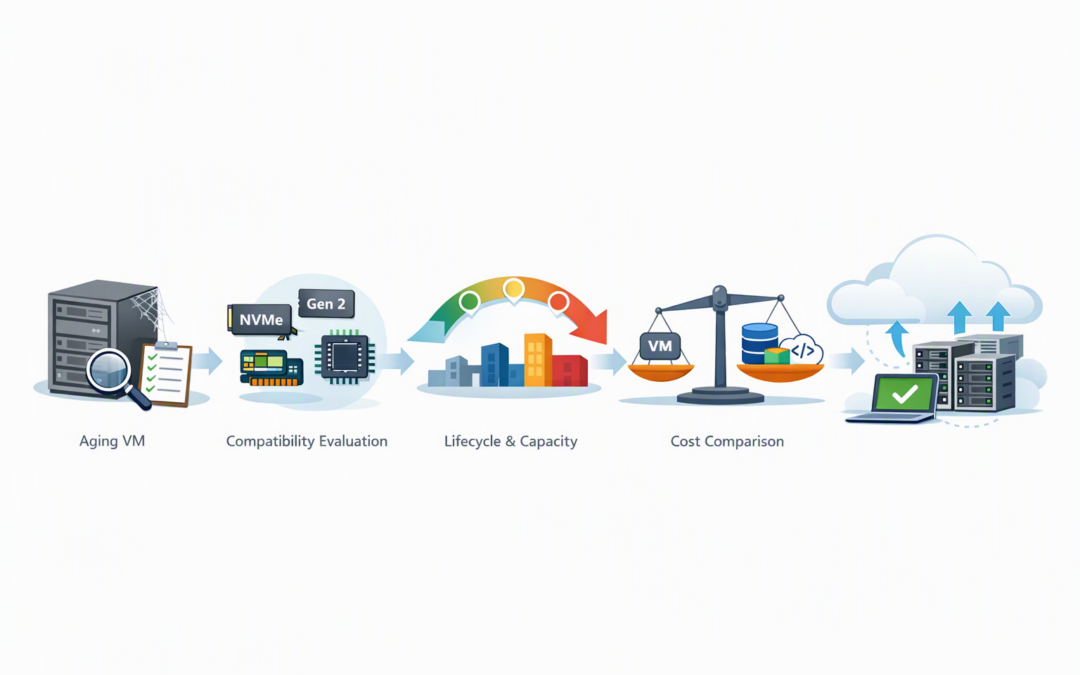
Use a five-step decision process
- Inventory the workload. Record the VM series, operating system, application owner, data dependencies, network connections and business criticality.
- Check compatibility. Validate MANA drivers, NVMe support, Generation 2 readiness and any vendor restrictions affecting the application or security appliance.
- Review lifecycle and capacity. Confirm the target series is appropriate for new deployments in the required Australian region and availability zone.
- Compare VM and PaaS options. Include licensing, support labour, patching, backup, monitoring and recovery costs rather than comparing compute prices alone.
- Pilot before committing. Test one representative workload, document performance and recovery results, then migrate in controlled waves.
If a workload remains on a VM, patching and maintenance still need to be predictable. Our practical guide to Azure Update Manager maintenance orchestration explains how to schedule updates without creating avoidable outages or audit gaps.
Turn the refresh into a business improvement
The best Azure VM refresh is not the one that moves every workload to the newest server. It is the one that leaves the business with fewer lifecycle surprises, lower operational effort and a platform that can support growth.
CloudProInc combines more than 20 years of enterprise IT experience with hands-on work across Azure, Microsoft 365, Defender and Wiz. As a Melbourne-based Microsoft Partner and Wiz Security Integrator, we assess refresh projects from cost, security and operational perspectives rather than treating them as simple infrastructure upgrades.
If you are not sure whether your next Azure VM refresh should be a resize, a rebuild or a move to PaaS, we are happy to review the current setup and identify the practical options — no strings attached.