
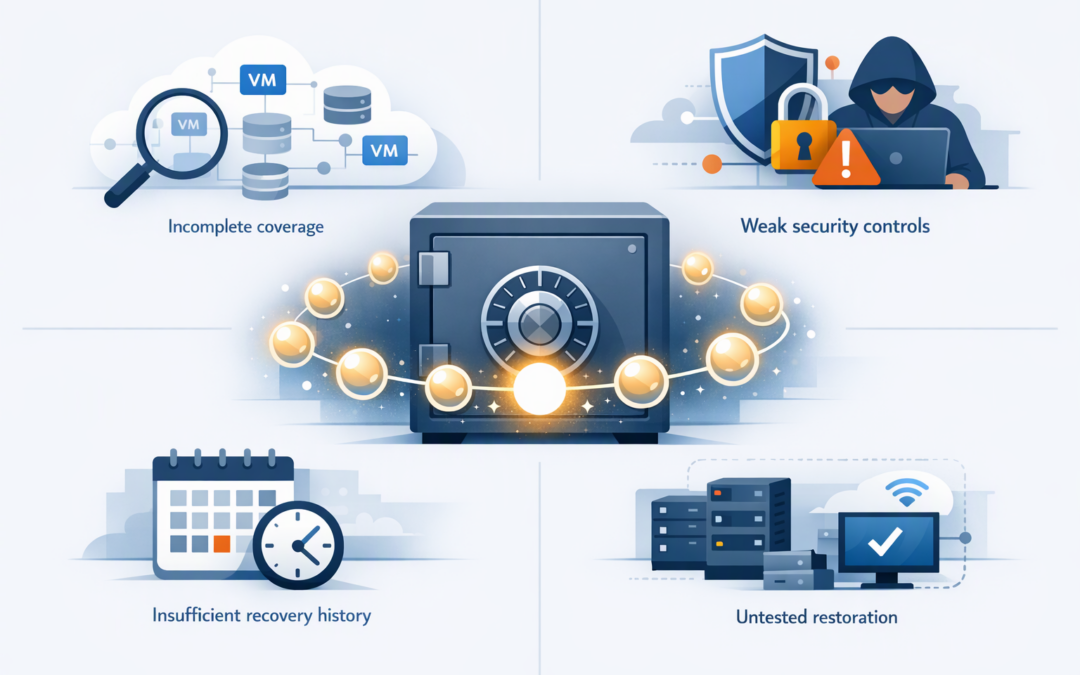
In this blog post Is Your Azure VM Backup Really Protected Against Recovery Gaps we will explain why successful backup jobs can still leave your business unable to recover when a server fails, an administrator makes a mistake or ransomware strikes.
At a high level, Azure VM Backup creates recovery points for your virtual machines, or VMs, which are cloud-based servers running your applications and data. The important distinction is that having recovery points is not the same as having a complete, secure and tested recovery process.
Many businesses see green ticks in the Azure portal and assume the risk is covered. The real test is whether the right systems can be restored, from a clean point in time, within the period the business can tolerate.
How Azure VM Backup works
Azure Backup uses policies to determine how often a VM is backed up and how long each recovery point is retained. These recovery points are managed through a Recovery Services vault, which is a protected Azure location used to store and control backup data.
CPI Consulting helps organisations design, build and secure Azure AI solutions, from Azure OpenAI and Microsoft Foundry to agents, governance and production deployment.
Visit CPI ConsultingRecent recovery points may be held as disk snapshots for faster restoration. Longer-term recovery points are stored in the vault. The first backup captures the full protected data set, while later backups generally record changes to reduce storage and processing requirements.
Azure can create application-consistent, file-consistent or crash-consistent recovery points. In plain English, this describes how neatly applications and data were prepared before the copy was taken. A crash-consistent backup may still be usable, but complex databases or business applications can need additional recovery work.
This technology is reliable when it is designed and managed correctly. Recoverability gaps usually appear around it: incomplete coverage, weak access controls, unsuitable retention, missing dependencies and restores that nobody has tested.
Gap one Your backup coverage is incomplete
A policy can report 100% success while important systems remain outside its scope. New VMs may not have been added, old test servers may now hold production data, or a newly selected disk type may require a different backup policy.
The first step is to compare the Azure asset list with the backup inventory. Do not start with the vault. Start with the business services that must keep operating, then identify every VM, disk, database and supporting component behind them.
Check policy compatibility as well. Azure’s Enhanced VM Backup policy supports newer configurations and can provide multiple backups per day for supported workloads. Organisations using Premium SSD v2 or Ultra disks should also review the available recovery methods, as discussed in our guide to Azure backup recovery for Premium SSD v2 and Ultra disks.
Business outcome: You avoid discovering during an outage that the most valuable server, disk or recent project was never properly protected.
Gap two An attacker can interfere with recovery
If one powerful administrator can change retention, stop protection and weaken backup controls, stolen credentials may give an attacker the same power. This is why backup security must be designed around compromised accounts, not just accidental deletion.
Azure provides several layers of protection. Soft delete keeps deleted backup data recoverable for a defined period. Vault immutability can block operations that would destroy recovery points, while locked immutability makes that protection irreversible for the relevant retention period.
Multi-user authorisation adds another safeguard through Azure Resource Guard. In plain English, this means a second, separately controlled approval boundary is required for sensitive backup operations. The person administering production systems should not be able to remove every recovery option without an additional control.
Our article on immutable Azure backups for ransomware resilience explains these protections in more detail. The key point is that immutability protects recovery points, but it does not confirm that those recovery points contain the right data or can be restored quickly.
Business outcome: A compromised administrator account is less likely to become a business-ending loss of production data and backups.
Gap three Your clean recovery window is too short
Ransomware is not always detected immediately. An attacker may remain inside an environment for days or weeks before encrypting systems, which means the most recent backups could already contain damaged data, malicious software or unwanted configuration changes.
A seven-day retention period may therefore be useless if the incident began three weeks earlier. Retention should reflect how long a problem could remain undetected, as well as legal, financial and operational requirements.
Recovery point frequency matters too. A daily backup can leave close to a full working day of data exposed between copies. Leaders should define the recovery point objective, meaning the maximum amount of recent data the business can afford to lose, before the technical team selects a schedule.
Business outcome: Backup costs and retention settings are connected to actual business risk rather than inherited defaults.
Gap four Nobody has tested the complete restore path
A restore test should prove more than whether Azure can create a replacement disk. It should confirm that the VM starts, the application opens, users can authenticate and the recovered data is complete and usable.
Cloud applications often depend on resources that are not contained inside the VM backup. These may include virtual networks, firewall rules, private connections, DNS settings, encryption keys, managed identities and access to a separate database.
Testing should take place in an isolated recovery network so it does not interfere with production. The test should record the actual recovery time, manual steps, missing permissions and decisions that need business approval.
Item-level recovery, which restores selected files rather than an entire server, can be useful for everyday mistakes. A ransomware event or complete application failure usually requires a broader recovery exercise.
Business outcome: The recovery time presented to management is based on evidence, not a vendor estimate or an untested assumption.
A common mid-market recovery scenario
Consider a 200-person professional services company with daily Azure VM backups and a dashboard showing no failed jobs. On paper, its main document system appears protected.
During a recovery exercise, the team discovers that the application also needs a separate database, an expired service credential and network rules created manually several years earlier. The VM restores, but the service remains unavailable while several people reconstruct its dependencies.
The business expected a four-hour recovery. The complete process takes nearly two days.
The solution is not simply to buy more backup storage. It is to document the full service, secure the recovery points, automate supporting infrastructure where practical and test the process against a business-approved target.
Seven questions leaders should ask
- Are all production VMs and critical disks covered by an appropriate backup policy?
- How much data could we lose based on the current backup frequency?
- How far back can we go if an attack remains undetected?
- Can one administrator stop protection or remove recovery points?
- Are immutability, soft delete and multi-user authorisation configured correctly?
- When did we last restore a complete business service in an isolated environment?
- Did the test meet the recovery time agreed with business leaders?
These checks also support the Essential Eight, the Australian government’s cybersecurity framework that includes regular backups as one of its core risk-reduction strategies. Azure Backup does not automatically prove Essential Eight compliance; your organisation still needs suitable scope, access controls, retention, testing and evidence.
It is also worth monitoring configuration through automation rather than relying only on occasional portal reviews. As our article on Azure management changes and immutable backup recovery gaps explains, better visibility is valuable when it leads to practical recovery checks.
Move from backup confidence to recovery evidence
The question is not whether Azure Backup works. The question is whether your configuration protects the right systems, resists destructive changes and restores a usable business service within an acceptable timeframe.
CloudPro Inc brings more than 20 years of enterprise IT experience to this work. As a Melbourne-based Microsoft Partner and Wiz Security Integrator, we assess Azure Backup alongside Microsoft Defender, which helps detect security threats, and Wiz, which identifies risks across cloud environments.
If you are not sure whether your current Azure backups would survive a real incident, we are happy to review the setup and identify the most important recoverability gaps — no strings attached.