
In this blog post How to Build an Azure SQL Ransomware Recovery Plan Boards Trust we will turn Microsoft’s new ransomware recovery guidance into a practical plan leaders can understand, fund and test.
The uncomfortable reality is that having Azure SQL backups does not guarantee a safe recovery. If attackers still control an administrator account, your team chooses the wrong restore point or nobody has tested the process, a restored database can be compromised again within minutes.
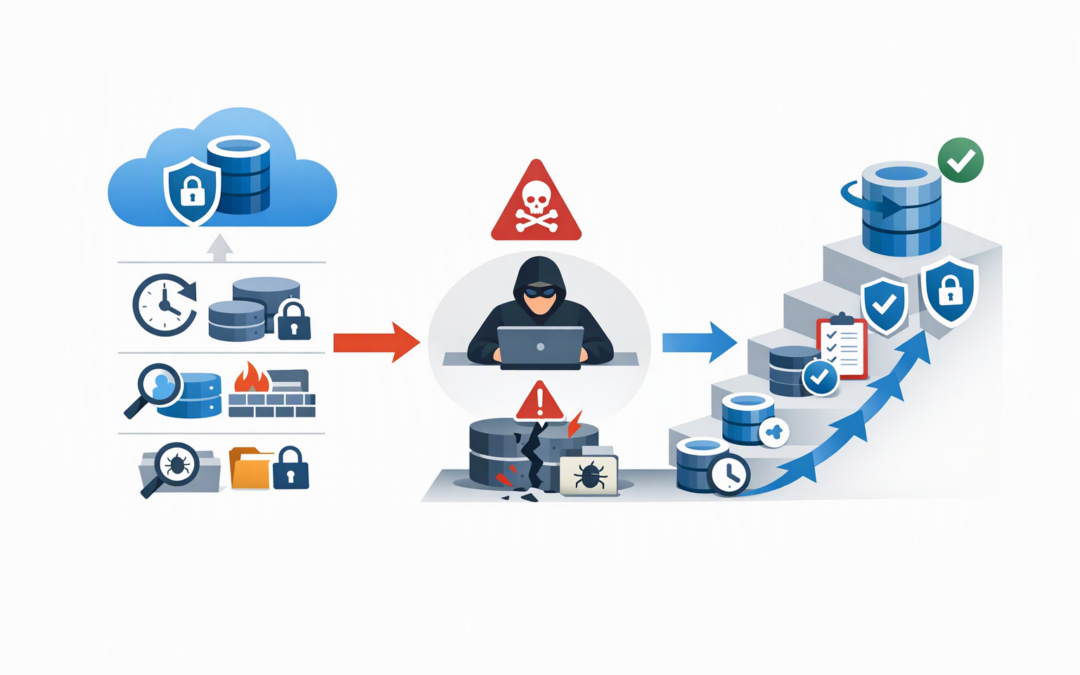
Microsoft’s new guidance addresses this problem with a seven-stage approach: protect, detect, contain, assess, restore, validate and harden. For a board, these stages should translate into clear answers about which business services return first, how long recovery takes, how much data could be lost and who approves the return to normal operations.
How Azure SQL recovery works in plain English
Azure SQL Database and Azure SQL Managed Instance are Microsoft-managed database services. They commonly hold the information behind finance systems, customer portals, inventory platforms, operational applications and reporting tools.
CPI Consulting helps organisations design, build and secure Azure AI solutions, from Azure OpenAI and Microsoft Foundry to agents, governance and production deployment.
Visit CPI ConsultingMicrosoft automatically creates backups that can return a database to an earlier time. This is called point-in-time restore, or PITR. Instead of repairing an encrypted or damaged database, Azure creates a new database using information captured before the incident.
Azure SQL now automatically provides immutability for up to the most recent seven days of PITR backups. Immutability means those protected recovery points cannot be changed or deleted during that period, even if an administrator account is compromised.
Organisations can also permanently lock immutability to their configured PITR retention period. This provides stronger protection, but it is an important governance decision because the lock cannot later be disabled and the retention period cannot be reduced.
Long-term retention, known as LTR, keeps selected backups for longer periods and can support regulatory, legal and historical recovery requirements. However, neither PITR nor LTR can recover information that has already fallen outside the retention window.
Turn the technical guidance into five board decisions
1. Decide which data must return first
Recovery priorities should come from the business, not from whichever technical system is easiest to restore. A customer ordering database may be more urgent than an internal reporting database, even if the reporting system is technically simpler.
For each critical database, agree on two targets:
- Recovery time objective: how long the business can operate without the database.
- Recovery point objective: how much recent data the business can afford to lose.
A statement such as “orders must return within four hours with no more than 30 minutes of lost transactions” is meaningful to both the board and the recovery team. “Azure backs it up automatically” is not.
This prioritisation should align with your wider board-ready Azure cyber recovery plan, including the applications, identities and network services each database needs.
2. Confirm that usable recovery points will survive
The board does not need a detailed backup configuration report. It does need evidence showing that appropriate recovery points exist, are protected from tampering and have recently been restored successfully.
Ask the technology team to document:
- The PITR retention period for every critical database.
- Whether immutability covers the full required retention period or only the automatic seven-day window.
- Which databases have long-term retention and why.
- Who can change backup policies, delete resources or alter encryption keys.
- The date and result of the latest recovery test.
Our guides to reliable immutable Azure SQL backups and ransomware-resilient Azure backup design cover the backup controls in more depth. The board-level question is simpler: can an attacker remove every usable recovery option?
3. Approve a first-15-minutes response card
Early decisions can protect recovery options or accidentally destroy them. Microsoft’s guidance recommends containing the specific affected resources, disabling compromised access and preserving evidence rather than immediately deleting everything that looks suspicious.
Your response card should tell the team to:
- Activate the incident response team and open the appropriate Microsoft support case.
- Block the confirmed attacker access without locking out the recovery team.
- Restrict unsafe public network access and untrusted firewall rules.
- Preserve Azure activity, sign-in, database audit and security logs.
- Extend available PITR retention where appropriate and preserve durable recovery copies before older points expire.
- Notify legal, privacy, insurance and executive stakeholders.
Do not rely on a document stored only inside the potentially compromised Microsoft environment. Keep an approved offline copy with current names, phone numbers, escalation paths and decision authorities.
4. Require evidence before selecting a restore point
The newest backup is not necessarily the safest backup. An attacker may have gained access days before deleting or encrypting data, meaning recent recovery points could already contain malicious changes.
The team must build an incident timeline using Azure activity records, Microsoft Entra ID sign-in logs, application monitoring and database audit logs. Microsoft Entra ID is the service that controls identities and sign-ins across Microsoft cloud services.
Tools such as Microsoft Defender for SQL, which detects suspicious database activity, and Wiz, which identifies risky cloud access paths and configuration gaps, can help reveal what happened. They do not replace careful investigation or business validation.
If a highly privileged Microsoft Entra administrator account was compromised, database recovery should wait until the identity environment is trusted again. Otherwise, the attacker may simply access the restored database using the same stolen permissions.
5. Make validation a formal business gate
A successful restore message only confirms that Azure completed a technical operation. It does not prove that customer balances are correct, orders reconcile or hidden attacker access has been removed.
Before production traffic returns, require evidence that:
- The database passes technical integrity checks.
- Critical records match trusted business reports.
- Database permissions and Azure administrator roles have been reviewed.
- Applications work correctly in an isolated test environment.
- Transactions reconcile across connected systems.
- The incident lead and accountable business owner approve the cutover.
Any failed or unresolved check should block reconnection. This may feel cautious during an outage, but repeating the compromise is usually far more expensive than extending validation by a few hours.
What this looks like in a 200-person business
Consider a 200-person distributor whose ordering platform depends on Azure SQL. Its backup dashboard is green, but nobody has tested a full recovery with the application, payment integration and identity environment.
After suspicious data deletion, the team restores the latest available database and reconnects the application. The stolen automation account remains active, allowing the attacker to damage the restored database again.
A board-ready plan changes the sequence. The team first blocks the compromised account, preserves evidence and identifies a safe recovery cutoff. It restores into an isolated environment, reconciles orders against payment records, reviews privileged access and obtains business-owner approval before reopening the service.
The backup technology is similar in both cases. The difference is planning, evidence and governance.
Support Essential 8 and Australian privacy obligations
This approach supports the Essential 8, the Australian Government’s cybersecurity framework that many organisations use to reduce common cyber risks. In particular, it strengthens regular backups, multi-factor authentication and restrictions on administrative privileges.
The Australian Signals Directorate also expects restoration from backups to be tested through regular disaster recovery exercises. A backup report without a successful restore test provides limited assurance.
If personal information may have been accessed or stolen, recovery is only one part of the response. Australian organisations covered by the Notifiable Data Breaches scheme may also need to assess whether the incident is likely to cause serious harm and whether notification is required.
Give the board a one-page recovery scorecard
A useful quarterly scorecard should show:
- Critical databases covered by approved recovery targets.
- Critical databases with protected and immutable recovery points.
- Percentage successfully restored and validated in the past 12 months.
- Actual recovery time compared with the agreed target.
- Open security or recovery gaps, their owners and due dates.
- Date of the next end-to-end ransomware exercise.
This turns backup from an assumed IT function into measurable business resilience. It also gives directors a clearer basis for funding decisions and risk acceptance.
Recovery confidence must be demonstrated
Microsoft’s new Azure SQL guidance makes one point especially clear: ransomware recovery is not a single restore button. It is a controlled process that removes attacker access, protects evidence, selects a trusted recovery point and validates the business outcome before operations resume.
CloudProInc combines more than 20 years of enterprise IT experience with hands-on Azure, Microsoft Defender and Wiz expertise. As a Melbourne-based Microsoft Partner and Wiz Security Integrator, we help organisations turn cloud recovery settings into plans that can be tested, measured and explained to leadership.
If you are not sure whether your Azure SQL environment could survive a compromised administrator account or a destructive ransomware incident, we are happy to review the current setup and identify the practical gaps — no strings attached.