
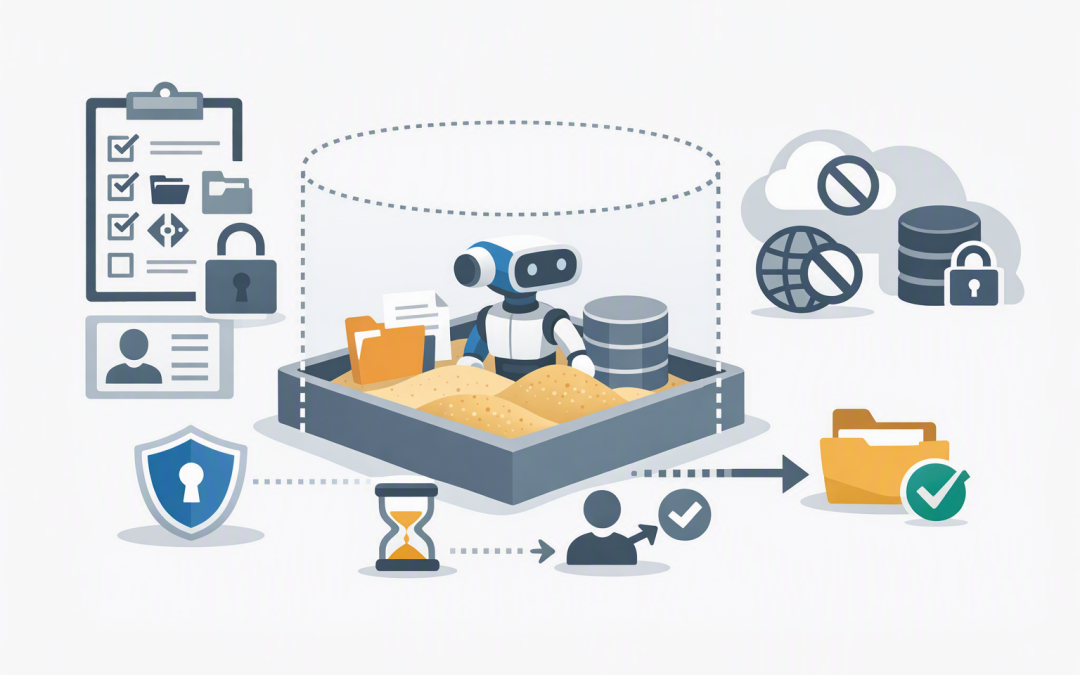
In this blog post Understanding Sandbox Manifests for Safer AI Agent Workflows we will explain why an AI agent can behave perfectly in testing, then fail or create security concerns when used across the business. The problem is often not the AI model. It is the inconsistent workspace surrounding it.
At a high level, a sandbox manifest is the packing list and setup plan for an AI agent’s secure workspace. It defines what files, folders, repositories, storage locations and basic settings should be available when the agent starts working.
This gives the agent a predictable environment without handing it broad access to production systems. It also gives business leaders a clearer answer to an important governance question: what exactly can this AI agent see and use?
What technology sits behind a sandbox manifest?
A sandbox is an isolated computing environment where an AI agent can inspect files, run approved commands, process data and create outputs. If something goes wrong, the problem is contained rather than spreading directly into company systems.
Modern sandbox agents can work with a file system, installed software packages, command-line tools and saved workspace state. This is useful for jobs such as reviewing documents, analysing spreadsheets, testing code or producing a website prototype.
The manifest describes how that workspace should look at the beginning of a new session. Depending on the platform, it may define:
- The files and folders copied into the workspace
- The source code repositories the agent can inspect
- Approved cloud storage locations
- Workspace folder names and structure
- Basic environment settings
- The user identity under which work should run
- Storage mounts, including whether they are read-only
In the OpenAI Agents SDK, for example, the manifest declares the starting contents and layout of a fresh workspace. The live sandbox session is then where files change and commands run. These sandbox features remain in beta, so organisations should expect implementation details to evolve.
A simplified manifest example
The following Python example shows the basic idea. It makes approved input documents and templates available to an agent responsible for drafting tender responses.
from pathlib import Path
from agents.sandbox import Manifest, SandboxAgent
from agents.sandbox.entries import LocalDir

manifest = Manifest(
 entries={
 "inputs": LocalDir(src=Path("./approved-inputs")),
 "templates": LocalDir(src=Path("./approved-templates")),
 },
 environment={
 "WORKFLOW_MODE": "draft_only"
 },
)

agent = SandboxAgent(
 name="Tender Draft Assistant",
 instructions=(
 "Use only the approved inputs and templates. "
 "Write drafts to the workspace for human review. "
 "Do not send or publish documents."
 ),
 default_manifest=manifest,
)
The code matters less than the operating principle. The agent starts with approved material, works inside a controlled location and produces a draft that remains subject to human review.
A manifest is not the same as an AI instruction
An instruction tells the agent what you want it to do. A manifest determines what exists in its working environment when it attempts to do it.
Telling an agent “only use approved documents” is helpful, but it is not a strong control if the agent can still browse an entire shared drive. A better design gives it only the approved documents in the first place.
A manifest is also not a complete security policy. Network access, credentials, command restrictions, approval steps and production permissions should be controlled separately. This builds on the principle covered in why the agent harness and sandbox compute should stay separate.
Why manifests matter to the business
1. Workflows become repeatable
Without a manifest, employees or developers may manually upload different files, install different tools or use different folder structures each time. The same request can then produce different results for reasons nobody can easily explain.
A standard manifest gives each fresh sandbox a known starting point. That reduces troubleshooting, failed runs and time spent asking why an agent worked yesterday but not today.
2. Sensitive information is easier to contain
An agent reviewing a supplier contract does not need access to payroll records, customer exports and every document in SharePoint. Its workspace should contain only what is required for that task.
This follows the principle of least privilege: give a person or system the minimum access needed to complete the job. It reduces the impact of incorrect instructions, malicious documents and simple configuration mistakes.
For more background on this control boundary, see when a business AI agent needs a secure sandbox.
3. AI costs become easier to control
Agents consume time and computing resources when searching large collections, installing unnecessary software or repeating failed tasks. Giving an agent an entire repository when it needs one folder can increase processing time without improving the result.
A focused manifest reduces the amount of material the agent must inspect. It can also help teams standardise software packages and avoid rebuilding the environment differently for every run.
4. You are less dependent on one sandbox provider
A well-designed manifest separates the description of the required workspace from the infrastructure that runs it. The exact format varies between platforms, but the business requirement remains understandable: these inputs, these settings and this level of access.
This makes future provider reviews more practical. Your team can compare security, location, performance and cost without redesigning the entire workflow around one vendor’s environment.
5. Governance reviews become more meaningful
“The agent only accesses what it needs” is difficult to audit. A version-controlled manifest provides something concrete for IT, security and risk teams to review.
Changes can go through approval before new data or storage locations become available. Combined with activity logs and human approval records, this creates stronger evidence for internal governance and customer assurance reviews.
What this looks like in a 200-person business
Consider a 200-person engineering consultancy introducing an agent to prepare first drafts of tender responses. Staff currently spend hours gathering previous submissions, capability statements, project examples and current staff profiles.
The unsafe approach is to connect the agent to the company’s entire document library and ask it to find whatever it needs. That is convenient, but it creates unnecessary privacy, accuracy and access risks.
A safer workflow uses a manifest to provide an approved tender folder, current company templates and selected project references. The sandbox blocks general network access, and the agent can create a draft but cannot email it or upload it to the tender portal.
The business outcome is faster drafting without removing accountability. Employees spend less time collecting material, security teams can see what the agent accessed, and a manager still approves the final submission.
If several specialised agents are involved, the same controls should follow each stage. Our article on handoffs and tools in multi-agent sandbox workflows explains how to coordinate that process without giving every agent the same access.
Questions to ask before approving a manifest
- What business task is this environment designed to complete? Avoid general-purpose access when the workflow has a specific purpose.
- Which files are genuinely required? Start narrowly and add information only when there is a demonstrated need.
- Is access read-only where possible? An analysis agent usually does not need permission to alter source documents.
- Are credentials kept outside the manifest? Use short-lived, restricted credentials rather than storing passwords or permanent access keys in configuration files.
- Can the agent reach the internet or internal systems? Network access should be blocked by default and opened only for approved destinations.
- What happens to outputs? Define where they are stored, who reviews them and whether the agent can publish them.
- When is the sandbox deleted? Retaining workspaces can improve continuity, but it can also leave behind sensitive files and outdated permissions.
The final question is especially important. Reusing a live sandbox versus starting fresh should be a deliberate business decision, not an accidental default.
How this supports Australian security requirements
A sandbox manifest does not make a business compliant with Essential Eight, the Australian Government’s cybersecurity framework that many organisations use to improve their security maturity. It can, however, support related practices such as limiting administrative access, controlling what software can run and reducing unnecessary access to sensitive information.
The manifest should sit within broader controls covering identity, Microsoft Defender security monitoring, device management through Microsoft Intune, which manages and secures company devices, and cloud risk visibility through platforms such as Wiz.
With more than 20 years of enterprise IT experience, CloudProInc approaches agent security as an operating model rather than a single product setting. As a Microsoft Partner and Wiz Security Integrator, our Melbourne-based team helps organisations connect AI controls with their existing Azure, Microsoft 365 and cybersecurity environment.
Start with the workspace, not just the model
A capable AI model cannot compensate for a poorly controlled working environment. A sandbox manifest makes the agent’s starting point repeatable, reviewable and easier to secure.
For business leaders, the benefit is not another configuration file. It is lower operational risk, fewer unpredictable failures, clearer cost control and greater confidence about where company information is going.
If you are planning an AI agent workflow and are not sure what it should be allowed to access, CloudProInc is happy to review the proposed workspace and controls with you — no strings attached.
Discover more from CPI Consulting
Subscribe to get the latest posts sent to your email.