
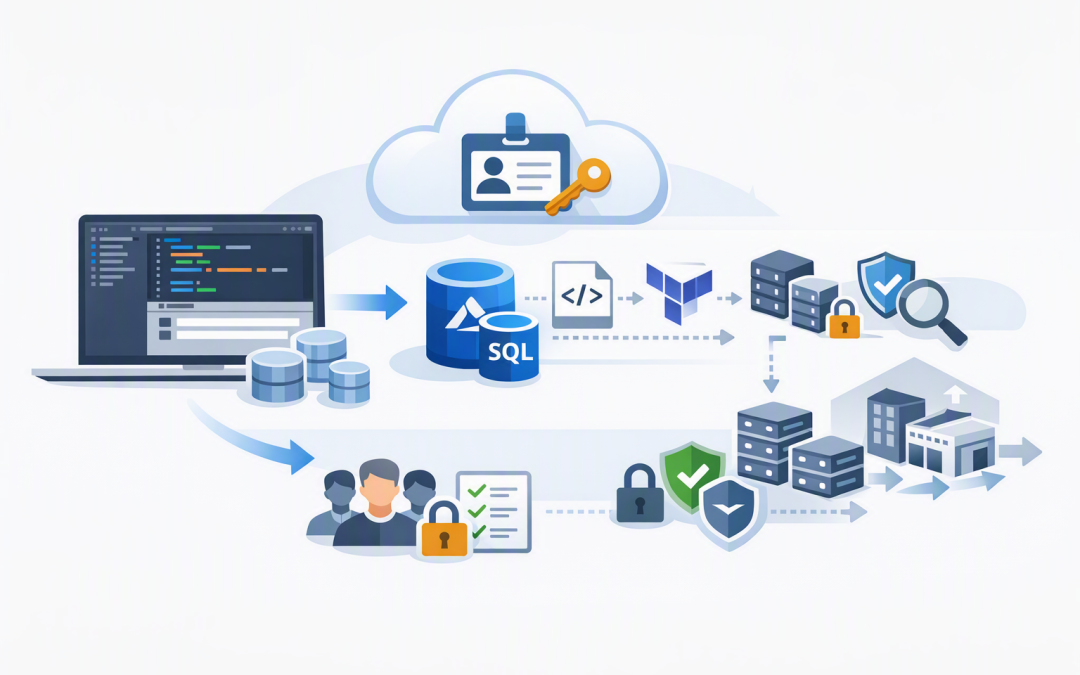
In this blog post Why In-Editor Azure SQL Provisioning Changes Cloud Delivery we will explain why creating databases inside Visual Studio Code can remove a surprisingly common delivery bottleneck without removing the controls your business needs.
The problem is familiar. A development team needs a database for a new application, customer demonstration or AI proof of concept, but the request disappears into a queue of portal work, access approvals and configuration questions.
Microsoft has now made Azure SQL Database provisioning generally available in the MSSQL extension for Visual Studio Code. Developers can create a free-tier cloud database, connect to it and begin working without constantly moving between their editor, the Azure portal and internal support channels.
What in-editor Azure SQL provisioning actually means
Azure SQL Database is Microsoft’s managed cloud database service. Microsoft handles routine infrastructure work such as operating system updates, database engine patching, backups and much of the availability management.
In-editor provisioning brings the database creation process into Visual Studio Code, the application development tool many engineering teams already use. The MSSQL extension adds a guided Deployments page where an authorised user signs in with Microsoft Entra ID, Microsoft’s cloud identity service, and selects the Azure subscription, resource group, SQL server and database name.
Once deployment finishes, the extension can save the connection and connect the developer automatically. The team can then create tables, run queries, design the database structure and test the application from the same workspace.
This sounds like a small interface improvement. For platform engineering teams, however, it changes where the cloud delivery process begins.
It removes low-value work from the platform queue
Platform engineering is about giving internal teams a safe, repeatable way to use technology. A platform team should be building those standard paths, not manually clicking through the same portal screens for every request.
Consider a 200-person software and services business with several product teams. If developers submit ten database requests each month, and every request takes an infrastructure specialist 60 to 90 minutes to review, provision, document and hand over, the business can lose 10 to 15 hours on routine administration.
The greater cost is often the delay. A database that takes two days to arrive may hold up an application test, customer demonstration or time-sensitive proof of concept.
In-editor provisioning lets approved developers handle suitable development databases themselves. The platform team can spend more time on production reliability, security, cost management and architecture rather than acting as a portal operator.
It creates a shorter path from idea to working environment
The new experience currently focuses on free-tier Azure SQL databases. Users can choose whether the database pauses after its free monthly allowance is exhausted or continues using chargeable serverless capacity. Advanced compute, storage and paid-tier choices still require another deployment method.
That limitation is important, but it also makes the feature useful for controlled experimentation. Teams can validate an application design, test an integration or prepare a demonstration before requesting a larger production environment.
This is particularly valuable for AI projects. Many AI applications still need a reliable database for customer records, permissions, workflow status and the source information supplied to an AI model.
A team exploring OpenAI or Anthropic Claude can establish the application’s data layer quickly, test the business case and only invest in a production architecture once there is evidence that the idea works.
It can become the front door to infrastructure as code
The strongest feature for platform teams is not the wizard itself. It is the ability to export the deployment as ARM, Bicep or Terraform scripts. These are infrastructure-as-code formats, meaning the cloud configuration is stored in a file that can be reviewed, repeated and tracked like application code.
A practical workflow could look like this:
- A developer provisions a free development database inside Visual Studio Code.
- The extension exports the deployment configuration as Bicep.
- The platform team reviews the file and adds company requirements.
- The approved template is stored in source control.
- Test and production environments are deployed through an automated pipeline.
The policy attached to that path might be expressed like this:
environment: development
approved_region: australiaeast
identity: microsoft_entra_id
public_network_access: disabled
cost_limit_action: pause
required_tags:
 - application_owner
 - cost_centre
 - data_classification
production_deployment: pipeline_only
This example is not a deployable Azure template. It shows the business rules that should surround the technical template, including who owns the database, where it may run and when a production review is required.
We explored the wider benefits of this approach in our guide to provisioning Microsoft Foundry with Bicep and Azure Developer CLI. The same principle applies here: start quickly, then turn the working configuration into a repeatable and governed deployment.
Faster provisioning still needs security guardrails
Giving developers a faster path should not mean giving everyone unrestricted access to the company’s Azure subscription. The MSSQL extension uses the permissions of the signed-in user, so poor access controls can simply make unsafe provisioning happen faster.
Before enabling the feature broadly, platform leaders should decide:
- Which teams are allowed to create databases.
- Which Azure subscriptions and resource groups they may use.
- Which Australian or international regions are approved.
- Whether public internet access is permitted.
- How Microsoft Entra groups and managed identities will control access.
- Which tags are required for ownership and cost reporting.
- How unused development databases will be identified and removed.
These controls also support Essential 8, the Australian Government’s cybersecurity framework that many organisations use to reduce common security risks. In particular, strong sign-in controls, restricted administrative privileges and controlled application access should be built into the provisioning path.
Microsoft Defender for Cloud can help identify security weaknesses across Azure, while Wiz provides broader cloud visibility and helps teams find risky combinations of exposure, permissions and sensitive data. These tools do not replace good provisioning standards, but they make it easier to confirm that those standards are being followed.
It is a development accelerator, not a production shortcut
A free database created from an editor should not automatically become a production database. Microsoft positions the free offer primarily for development and proof-of-concept use, and the in-editor workflow does not expose the full range of compute, storage and resilience settings.
Production systems still need decisions about private connectivity, recovery objectives, monitoring, auditing, data residency, capacity and outage protection. Business-critical workloads may also need zone redundancy, which spreads resources across separate data centre locations.
Our article on designing zone-resilient Azure SQL Managed Instance workloads explains why availability choices must follow business impact rather than developer convenience.
The right model is simple: use in-editor provisioning to accelerate safe development, then use reviewed infrastructure-as-code templates and deployment pipelines for production.
What tech leaders should do next
Start with one development team and one controlled Azure subscription. Measure how long database requests take today, then compare that with the in-editor process.
At the same time, define a clear boundary between experimentation and production. Developers should know what they may create themselves, when platform review is required and which security settings are non-negotiable.
Microsoft’s move toward Visual Studio Code is broader than this feature. Azure Data Studio was retired on 28 February 2026, with Microsoft directing supported SQL development workflows toward Visual Studio Code and the MSSQL extension.
For most organisations, the business outcome is not simply faster database creation. It is fewer internal tickets, shorter development cycles, better use of specialised staff and a clearer path from an experiment to a governed cloud service.
CloudProInc combines more than 20 years of enterprise IT experience with practical expertise across Azure, Microsoft 365, Microsoft Defender and Wiz. As a Melbourne-based Microsoft Partner and Wiz Security Integrator, we help organisations build self-service cloud processes that remain secure, supportable and cost-aware.
If you are not sure whether your current Azure provisioning process is protecting the business or simply slowing everyone down, we are happy to take a look — no strings attached.
Discover more from CPI Consulting
Subscribe to get the latest posts sent to your email.