
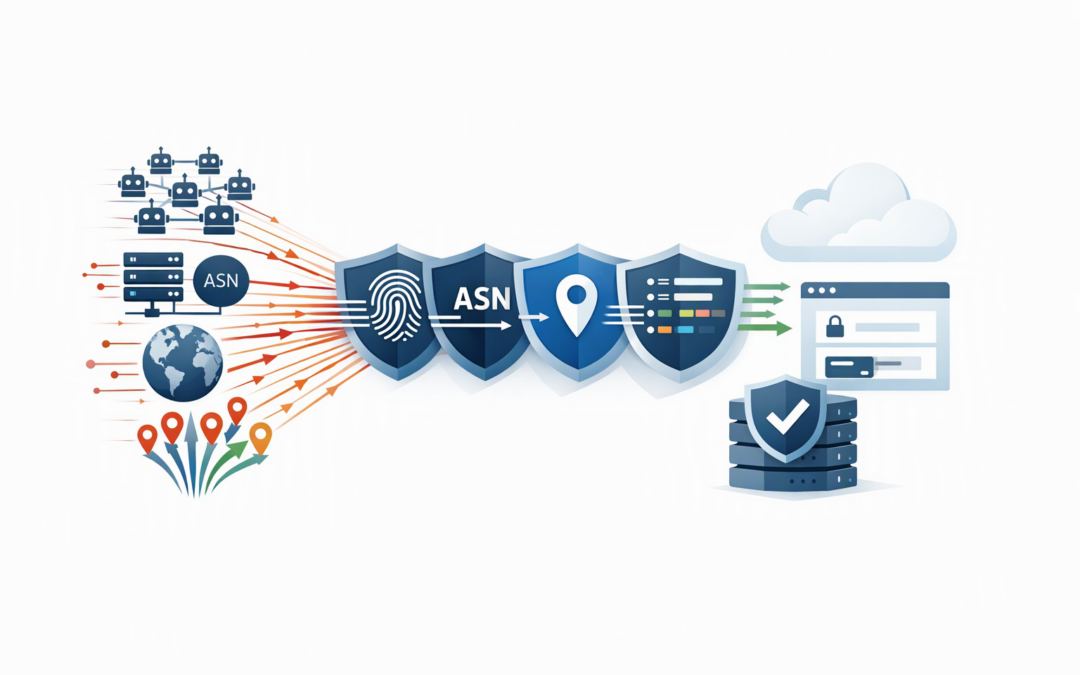
In this blog post How Rate Grouping Hardens Azure Front Door WAF Against Attacks we will explain how to control distributed request floods before they slow your applications, increase Azure costs or disrupt customers.
The problem is that conventional rate limiting watches individual internet addresses. An attacker can avoid the limit by spreading requests across thousands of compromised devices, with each device staying below the threshold. The traffic looks harmless when viewed one address at a time, but the combined volume can overwhelm an application.
Azure Front Door is Microsoft’s global service for directing and protecting web traffic. Its Web Application Firewall, or WAF, inspects requests before they reach your application. Rate limit grouping gives the WAF additional ways to recognise related requests, even when they arrive from different addresses. On Azure Front Door Premium, these additional grouping options currently remain in preview.
Why IP-based rate limiting is no longer enough
A standard rate limit might allow each internet address to make 500 requests every five minutes. That works well against a single computer repeatedly hitting a sign-in page or application programming interface, commonly called an API.
CPI Consulting helps organisations design, build and secure Azure AI solutions, from Azure OpenAI and Microsoft Foundry to agents, governance and production deployment.
Visit CPI ConsultingIt becomes less effective when 5,000 bots each send only 100 requests. No individual bot breaks the rule, yet the application receives 500,000 requests. The result may be slower response times, exhausted application resources and an unexpected increase in usage-based Azure charges.
This is why grouped rate limits should complement, rather than replace, per-address controls. Our earlier guide to Azure Front Door WAF group-by rate limiting explains the available groupings. The next step is turning those options into a practical defence strategy.
How grouped rate limiting identifies distributed traffic
Azure Front Door Premium can group matching requests in four useful ways. Each method answers a different business risk.
JA4 client fingerprint
A JA4 fingerprint describes how a device or software client establishes an encrypted connection. In plain English, it gives the WAF a way to recognise similar client software even when its internet address changes.
This can help contain botnets that rotate through large numbers of addresses while continuing to use the same automation tools. However, legitimate users can share fingerprints, particularly when using popular browsers, so thresholds must be tested carefully.
Autonomous system number
An autonomous system number, or ASN, identifies the network carrying the traffic. It might represent an internet provider, cloud platform or hosting company.
Grouping by ASN can help when abusive traffic is spread across many addresses owned by the same hosting network. It avoids the ongoing work of maintaining large and frequently changing address lists.
Country or region
This groups requests according to their geographic origin. It may be useful when an attack is concentrated in a region where the business has few or no customers.
Geographic limits need caution. A blunt rule can block travelling employees, international customers or users connected through corporate security services.
All matching requests
The None grouping places every request matching the rule into one shared counter. Despite the name, it does not mean that grouping is disabled.
This is useful for tightly defined resources such as a password reset endpoint, an expensive search function or a limited-capacity partner API. It should not normally be applied broadly across an entire website because one traffic spike could affect every user.
A practical layered design
There is no single grouping that catches every distributed attack safely. A better design uses several focused rules.
- Keep a per-address limit to stop individual clients making excessive requests.
- Add a JA4 rule to detect automation moving through many addresses.
- Add an ASN rule where appropriate to contain traffic from hosting networks that do not normally serve your customers.
- Use a shared counter on sensitive routes to protect sign-in, password reset, payment and high-cost API functions.
- Apply geographic grouping selectively when normal customer locations are well understood.
Azure Front Door allows one grouping variable per rate limit rule. If you want to count the same traffic by fingerprint and network, you need two separate rules. Existing rules without a grouping continue to count traffic by socket address, which is the address connecting directly to Front Door.
For applications with different risk levels, combine this approach with route-level WAF policies. Your public content can have a generous baseline, while sign-in and API routes receive tighter limits.
Example of a fingerprint-based rule
The following simplified configuration groups requests to a sign-in API by JA4 fingerprint. It uses logging first so the security team can measure the effect before blocking traffic.
{
 "name": "LogLoginFloodByJa4",
 "priority": 20,
 "enabledState": "Enabled",
 "ruleType": "RateLimitRule",
 "rateLimitDurationInMinutes": 5,
 "rateLimitThreshold": 500,
 "groupBy": [
 {
 "variableName": "Ja4"
 }
 ],
 "matchConditions": [
 {
 "matchVariable": "RequestUri",
 "operator": "BeginsWith",
 "matchValue": [
 "/api/login"
 ]
 }
 ],
 "action": "Log"
}
The threshold of 500 is an example, not a recommended universal setting. A customer portal used occasionally by 300 employees needs a different limit from a consumer service processing thousands of sign-ins each minute.
Azure Front Door also counts requests separately at each global edge location, rather than maintaining one worldwide counter. A threshold must therefore be based on the traffic seen at an individual edge location, not only the application’s total request volume.
How to deploy grouped limits without blocking customers
- Collect a normal traffic baseline. Review at least seven days of Front Door access logs, including weekday peaks, scheduled integrations and marketing events.
- Measure each edge location. Look at peak and 99th-percentile request rates for the path and grouping being considered.
- Start with the Log action. This records when the rule would trigger without interrupting users.
- Investigate the matches. Confirm whether the requests came from customers, business integrations, security testing or unwanted automation.
- Choose the least disruptive response. Azure Front Door Premium can present a JavaScript challenge or CAPTCHA instead of immediately blocking clients.
- Move to prevention gradually. Apply blocking to the narrowest route first, monitor the result and document a rollback plan.
Microsoft recommends using larger windows with sensible thresholds where possible. Very low thresholds can be less precise because requests may reach different Front Door servers before counters are fully updated. Rate limiting should be treated as a protective control, not an exact billing quota.
A realistic business scenario
Consider a 200-person company running a customer portal in Azure. Its sign-in service calls several back-end systems, making each login request more expensive than loading a public web page.
A distributed bot campaign sends low-volume requests from thousands of addresses. The existing per-address rule never triggers, but database load rises, customers experience delays and additional application capacity is activated.
By retaining the per-address rule and adding fingerprint and shared sign-in limits, the company can restrict the combined flood closer to the edge. Fewer unwanted requests reach the application, reducing outage risk and limiting unnecessary cloud consumption.
If the sign-in flow uses modern tokens, the controls can also complement the approaches covered in Azure Front Door JWT security. Rate limiting controls volume, while token validation helps determine whether a request is authorised.
What this means for governance and risk
Grouped rate limiting does not by itself deliver compliance with the Essential Eight, the Australian Government’s cybersecurity framework. However, it supports broader risk management by reducing exposure to automated abuse and helping keep important customer services available.
Because the expanded grouping options are still preview features, organisations should document their use, test failure scenarios and review Microsoft’s support terms. Critical services should not rely on a single preview control as their only defence.
Build the rules around your real traffic
The goal is not to block as much traffic as possible. It is to stop abusive volume while allowing employees, customers and trusted systems to work normally.
CloudProInc combines more than 20 years of enterprise IT experience with hands-on work across Azure, Microsoft 365, Microsoft Defender and Wiz. As a Melbourne-based Microsoft Partner and Wiz Security Integrator, we help organisations review real traffic, set defensible limits and deploy changes without turning production into a test environment.
If you are unsure whether your Azure Front Door rules would withstand a distributed attack, we are happy to review the setup and identify practical improvements — no strings attached.