
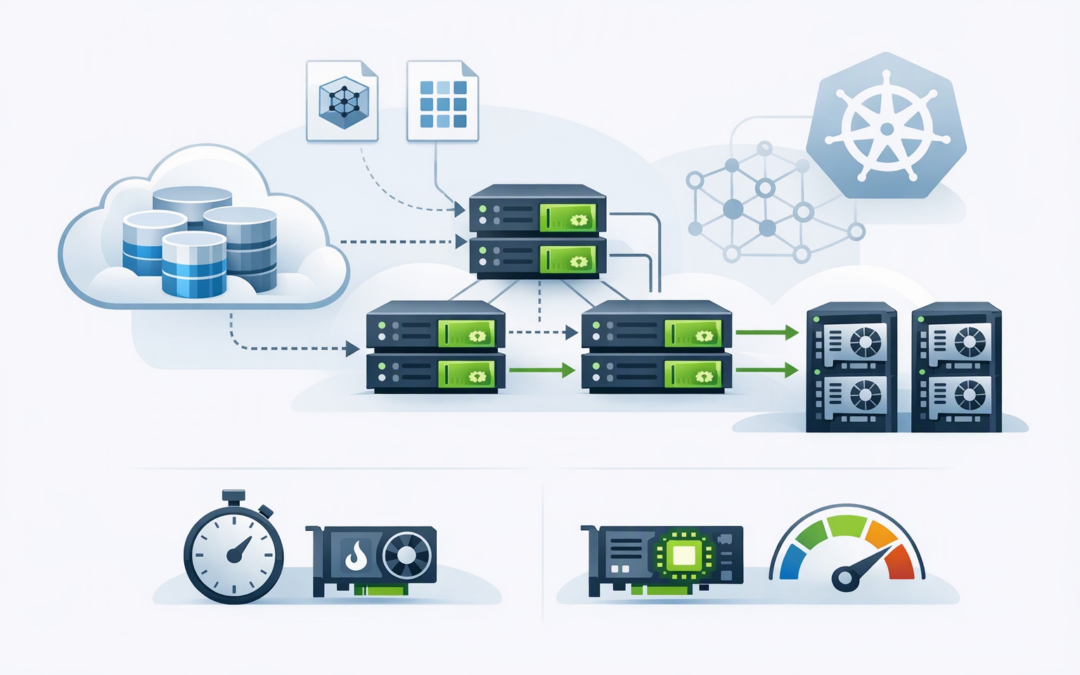
In this blog post Running AI Workloads on AKS with Distributed Storage Caching we will explain why expensive AI infrastructure can sit idle while model files are still loading, and how a distributed cache can bring frequently used data closer to your Azure Kubernetes Service workloads.
At a high level, Azure Kubernetes Service, or AKS, runs AI applications across groups of cloud servers. Those applications often need to retrieve very large model files or datasets from Azure Blob Storage before they can start useful work. If the same files are downloaded after every restart, update or scaling event, the business pays for powerful graphics processing units, or GPUs, that are waiting rather than processing requests.
Distributed storage caching addresses this problem by temporarily keeping frequently requested data on fast disks inside the AKS cluster. Azure Blob Storage remains the permanent source of truth, while the cache provides a shorter path to data that applications repeatedly need.
Why storage becomes an AI cost problem
Traditional business applications might load a few hundred megabytes when they start. A production AI model can require tens or hundreds of gigabytes of model weights, which are the files containing what the model learned during training.
CPI Consulting helps organisations design, build and secure Azure AI solutions, from Azure OpenAI and Microsoft Foundry to agents, governance and production deployment.
Visit CPI ConsultingWhen one AI application starts, downloading those files may be manageable. The problem appears when several application instances start together, failed workloads restart or the business adds more GPU capacity to handle demand.
Every new instance may request the same files from remote storage. This can lead to slower deployments, repeated storage traffic and unpredictable recovery times during an incident.
The commercial issue is simple. GPU servers are among the most expensive resources in an AI platform. A ten-minute storage delay across multiple GPUs is not merely an IT inconvenience; it is paid computing capacity producing no business value.
How distributed storage caching works
Microsoft’s Distributed Accelerator for Cloud Storage, or DACS, is a read-through cache designed for data-heavy Kubernetes workloads. “Read-through” means the application asks the cache for data first. If the data is not available locally, it is retrieved from Azure Blob Storage and placed in the cache for later requests.
AI application on AKS
 |
 v
Distributed cache checks for the requested model data
 |
 +-- Cache hit --> Read from fast local storage
 |
 +-- Cache miss --> Read from Azure Blob Storage
 and retain a temporary cached copy
The cache is distributed across several cache servers rather than relying on one machine. Each server uses local NVMe storage, which is a fast disk attached directly to the server. The client identifies which cache server should hold a particular piece of data and sends the request there.
This design spreads capacity and traffic across the cache layer. It also means cache capacity can grow as additional cache servers are introduced, subject to careful network and storage planning.
Importantly, the cached copy is temporary. If a cache node disappears, the original model or dataset still exists in Azure Blob Storage. DACS is not a backup platform, a permanent file system or a place to store training results and checkpoints.
What this changes for the business
1. Faster AI application startup
The first request for a model may still need to retrieve data from Blob Storage. Later application instances can reuse the cached data, reducing the time between allocating GPU capacity and serving real requests.
This matters when an AI service must scale quickly, recover after a node failure or complete a rolling update without creating a long period of reduced capacity.
2. Less paid GPU waiting time
Consider an illustrative company running eight GPUs for an internal AI service. If each GPU waits ten minutes for model data during two deployment or restart events per day, the company loses roughly 2.7 GPU-hours daily.
Caching will not remove every delay, but recovering even part of that idle time can improve the economics of the platform. The saving becomes more significant as the number and cost of GPU servers increase.
3. More predictable scaling
AI demand is rarely constant. A customer-facing assistant may become busy during business hours, while document processing may peak after large file uploads.
When scaling depends on repeatedly downloading large models from remote storage, adding GPU capacity does not guarantee an immediate increase in usable capacity. A warm cache, meaning the required data is already present, can make scaling behaviour more consistent.
4. Reduced repeated storage traffic
Repeatedly transferring identical model files creates unnecessary activity between storage and compute. A cache can reduce those repeated reads when applications share the same models or training jobs reuse portions of the same dataset.
The result may be lower storage-related traffic and less pressure on the remote storage path. However, the cache has its own server, disk and management costs, so the correct goal is lower total cost rather than simply lower Blob Storage usage.
Where distributed caching will not help
Caching delivers value when data is reused. If every workload reads different information once and never requests it again, the cache may add cost and complexity without producing enough cache hits.
It is also important not to confuse storage caching with other AI caches. A model-data cache accelerates access to model files and datasets. It does not replace a container image cache, and it is not a large language model KV cache, which temporarily stores information created while generating a response.
Capacity must be based on the active working set, meaning the models and dataset portions used regularly, rather than every file the organisation owns. Leaders should also allow space for overlapping model versions during upgrades and for data to be removed when the cache becomes full.
Security and preview limitations need attention
At the time of writing, Microsoft lists DACS as a preview capability without a production service-level agreement. That makes it suitable for controlled evaluation, but organisations should be cautious about placing it directly under a critical production service without fallback and recovery planning.
The current security model also treats the AKS cluster as one trusted environment. Workloads that can reach the cache may be able to access cached information, so it should not be treated as a security boundary between unrelated customers, departments or tenants.
For Australian organisations, this deserves particular attention when model data contains personal, financial, health or commercially sensitive information. Access should be limited using Microsoft Entra identities, network controls and tightly governed AKS permissions.
Caching also does not replace the Essential Eight, the Australian Government’s cybersecurity framework for reducing common attack risks. Patch management, restricted administration, application controls, monitoring and reliable backups remain necessary.
A practical assessment before you build
Before adding distributed caching, ask your platform team or provider to measure the current problem. Useful questions include:
- How long do AI workloads wait for model data before becoming ready?
- How often are the same models downloaded after restarts or scaling events?
- How many paid GPU-hours are lost to storage-related delays?
- What percentage of model and dataset reads are repeated?
- How much fast cache storage would the active working set require?
- What happens when the cache is empty, unavailable or being upgraded?
- Can every workload in the cluster be treated as equally trusted?
Start with a representative model and a non-production AKS environment. Compare cold-cache performance, where nothing has been stored locally, with warm-cache performance. Then test restarts, scale-outs, cache-node loss and fallback to Blob Storage.
If you want a closer look at the Azure-specific implementation, our related article on how DACS reduces AI startup delays and GPU waste on Azure AKS explores its use cases and preview limitations in more detail.
The goal is better GPU use, not more infrastructure
Distributed storage caching can make AI workloads on AKS faster and more economical when large models or datasets are read repeatedly. The strongest business case usually comes from shorter startup times, more predictable scaling and fewer expensive GPU minutes spent waiting.
It is not automatically the right answer for every AI platform. The likely cache-hit rate, security model, operational overhead and preview status should all be assessed before making it part of a production design.
CloudProInc is a Melbourne-based Microsoft Partner and Wiz Security Integrator with more than 20 years of enterprise IT experience across Azure, AKS, OpenAI, Claude and cloud security. If you are unsure whether storage delays are increasing the cost of your AI platform, we are happy to review the setup and identify where the real bottleneck sits—no strings attached.