
In this blog post How the Azure OpenAI Decisions API Cuts Agent Cost and Delay we will explain how mid-market teams can make routine AI agent decisions faster, reduce unnecessary model spending and keep higher-risk choices under human control.
Many business agents are using an expensive, general-purpose AI model to answer very small questions. They generate a paragraph when the application only needs to know “yes or no”, “which team?” or “how urgent?”. That adds cost and delay every time the workflow runs.
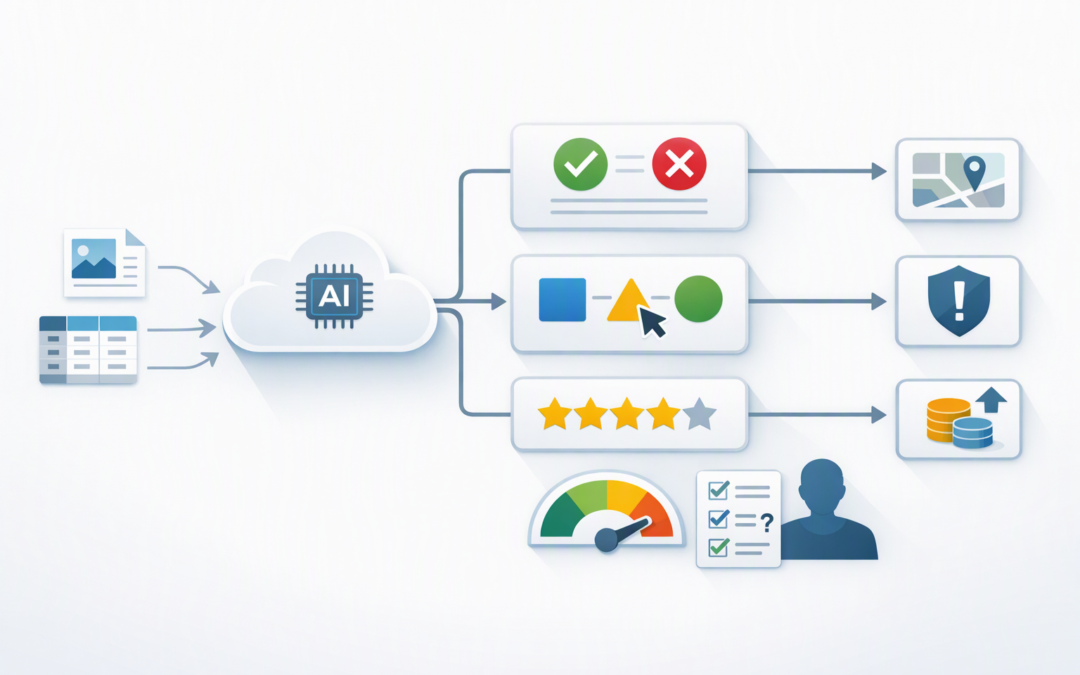
The Azure OpenAI Decisions API addresses this problem by returning a focused, structured decision instead of a written response. It can classify a request, select from approved options or assign a score that another system can use immediately.
What is the Azure OpenAI Decisions API?
The Decisions API is a specialised Azure OpenAI endpoint available through Microsoft Foundry, which is Microsoft’s platform for building and managing AI applications. It currently uses GPT-6 Luna and can evaluate text, images and structured business data.
CPI Consulting helps organisations design, build and secure Azure AI solutions, from Azure OpenAI and Microsoft Foundry to agents, governance and production deployment.
Visit CPI ConsultingThink of it as a quick decision layer for an AI workflow. You provide the evidence, define the permitted answers and receive a result that software can act on without having to interpret a long AI-generated explanation.
There are three main decision types:
- Predicate: Estimates the probability that a condition is true, such as whether a support ticket describes a security incident.
- Choice: Selects from a fixed list, such as billing, technical support or customer service.
- Score: Rates something against an ordered scale, such as low, medium, high or critical risk.
The result is machine-readable, meaning your application receives a predictable value rather than prose that must be analysed again.
Why using a full AI response for every decision becomes expensive
An agent may make several decisions before it completes one useful task. It might classify an email, choose a system, assess urgency, check an answer and decide whether a person needs to review it.
If each step calls a general-purpose model and asks for a written explanation, the business pays for repeated input and generated output. Employees also wait while the model produces text nobody needs to read.
The Decisions API currently charges for input tokens, which are the small pieces of text processed by the model, without a separate output-token charge. Published pricing at launch was US$0.10 per million uncached input tokens and US$0.01 per million cached input tokens, although Azure pricing and regional availability should always be confirmed before budgeting.
For suitable tasks, decisions can also be up to ten times faster than sending the same bounded question through the GPT-6 Luna Responses API. The exact result will depend on input size, region, demand and application design, so production testing remains important.
Where mid-market teams can use it
1. Route requests before using an expensive model
A business does not need its most capable AI model to handle every request. The Decisions API can identify whether a request is simple, sensitive or genuinely complex, then direct it to the right model, tool or employee.
A password-reset question might go to a low-cost support workflow. A complicated contract question could be sent to a stronger reasoning model, while a legal or privacy issue could be escalated to a person.
This complements the model-selection approach discussed in how Microsoft Orchard makes powerful AI agents more affordable. The objective is not to use the smallest model for everything. It is to reserve expensive capability for work that needs it.
2. Triage service requests in near real time
An internal service desk can assess an incoming request for department, urgency and possible security impact in one call. The same evidence is shared across the questions, reducing the need to send the ticket repeatedly.
For example, an email saying that a finance manager cannot sign in after receiving an unexpected authentication notification might be classified as an identity issue, scored as high urgency and marked as a possible security event.
The business outcome is faster escalation and less manual sorting. It also reduces the risk of an important warning sitting in the wrong queue for several hours.
3. Add confidence-based human review
AI decisions should not automatically trigger every business action. A probability or confidence score can be compared with thresholds set by the organisation.
A result above 95% might be processed automatically. A result between 70% and 95% could be queued for review, while a lower-confidence result could be sent to an experienced employee with the original evidence attached.
This is particularly important for payments, employment decisions, customer complaints, security incidents and regulated data. The API helps control a workflow, but it does not remove management accountability.
4. Check agent output before it reaches a customer
The Decisions API can review another model’s output against clear criteria. It might check whether a draft includes an unsupported refund promise, exposes private information or fails to answer the customer’s question.
If the answer fails the check, the workflow can retry, use a different model or involve a person. This gives the organisation a practical quality gate without asking another model to write a lengthy critique.
It can also help keep multi-agent systems under control. As we explain in choosing between simple AI assistants and multi-agent solutions, adding more agents only makes sense when each one creates measurable value.
A practical cost scenario
Consider a 200-person services company processing 50,000 short records each business day. Each record needs to be classified before it enters an automated workflow, and the average input is 600 tokens.
That is roughly 30 million input tokens per day. At the launch price of US$0.10 per million uncached input tokens, the decision-processing component would be about US$3 per business day, before currency conversion and any surrounding Azure services.
This is only an illustrative API calculation, not a complete project quote. Integration, monitoring, storage, security and human review still matter. However, it shows why using a focused decision endpoint can be more sensible than generating thousands of unnecessary written responses.
Costs can be reduced further by limiting the evidence sent with each request and reusing cached context where appropriate. Our guide to smarter context management for AI agents explains why sending less irrelevant information usually improves both speed and cost.
What the implementation looks like
The following simplified Python example sends a support message to an Azure OpenAI deployment and asks for a routing choice and urgency score. Microsoft Entra ID, which manages employee and application identities, is generally preferable to storing long-lived API keys in production.
import os
from openai import OpenAI

client = OpenAI(
 api_key=os.environ["AZURE_OPENAI_API_KEY"],
 base_url="https://YOUR-RESOURCE-NAME.openai.azure.com/openai/v1/"
)

decision = client.decisions.create(
 model="gpt-6-luna-deployment",
 input="Customer cannot access payroll after a suspicious login alert.",
 questions=[
 {
 "type": "choice",
 "name": "queue",
 "instructions": "Which team should receive this request?",
 "choices": [
 {"value": "service_desk"},
 {"value": "security"},
 {"value": "payroll"}
 ]
 },
 {
 "type": "score",
 "name": "urgency",
 "instructions": "How urgent is this request?",
 "levels": [
 {"label": "low"},
 {"label": "medium"},
 {"label": "high"},
 {"label": "critical"}
 ]
 }
 ]
)

print
In a production system, the code would also handle refusals, low-confidence answers, service errors and logging. It should never silently assume that an unavailable or uncertain answer means approval.
What to check before adopting it
- Choose bounded decisions. Start with repeated questions that have a short, approved list of answers.
- Build a test set. Compare the API against decisions previously made by experienced employees.
- Set escalation thresholds. Decide which confidence levels permit automation and which require review.
- Protect business data. Apply access controls, retention policies, private networking where required and clear rules about what information can be sent.
- Monitor accuracy and cost. Track incorrect routing, employee overrides, processing time and total Azure spending.
Australian organisations should also consider the Privacy Act, contractual data-handling obligations and the Essential Eight, the Australian Government’s cybersecurity framework that many organisations use to reduce common attack risks. Using Azure does not automatically deliver compliance; the surrounding identities, devices, applications and operational processes must also be secured.
The Decisions API is most valuable when it replaces repeated, narrow judgement calls rather than creative or complex analysis. If users need a written explanation, a custom data structure or deep reasoning, the Azure OpenAI Responses API may remain the better option.
Start with one decision that happens often
Do not rebuild an entire business process around a new API on day one. Select one frequent decision, measure the current cost and delay, then test whether the Decisions API can match the required accuracy with clear human fallbacks.
CloudProInc combines more than 20 years of enterprise IT experience with hands-on Azure, OpenAI, Claude and cybersecurity work. As a Microsoft Partner and Wiz Security Integrator, we can assess both the business case and the controls around an AI workflow without turning it into an oversized project.
If you are unsure whether your agents are spending too much time and money making simple decisions, we are happy to review the workflow and identify a practical place to start — no strings attached.