
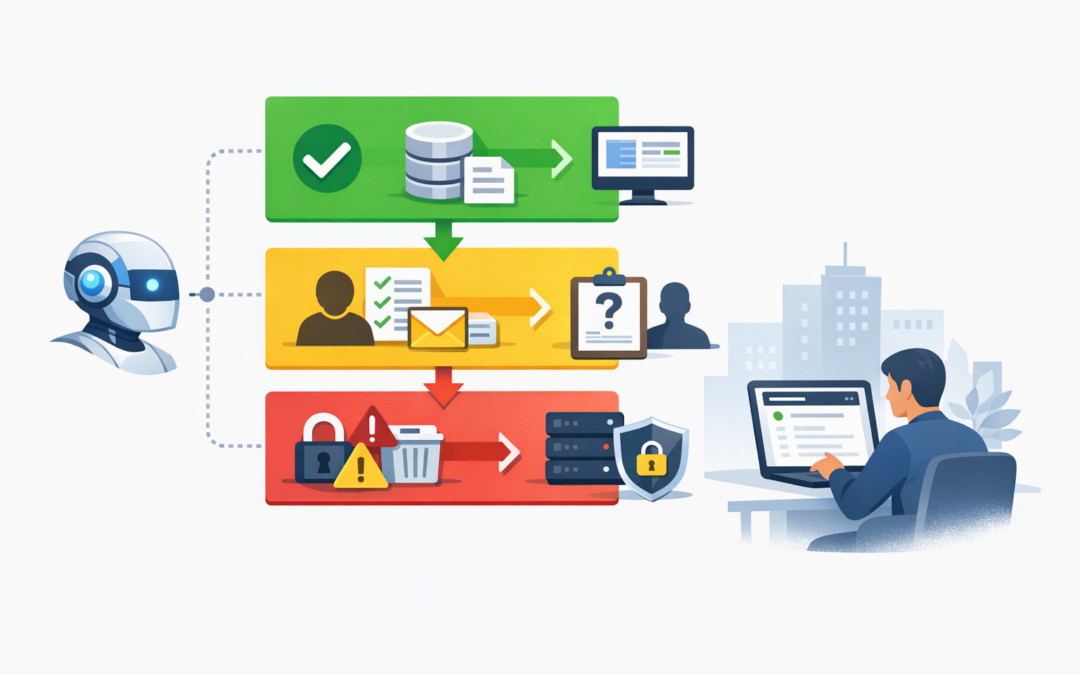
In this blog post How MCP Approval Policies Secure Microsoft AI Agent Tool Use we will explain how to stop an otherwise useful AI agent from becoming an uncontrolled business risk. The problem is rarely the agent answering a question incorrectly. The bigger concern is an agent closing a support ticket, changing a customer record, sending an email or deleting data without the right person checking the action.
Microsoft Agent Framework helps organisations build AI agents that can reason, follow workflows and use business tools. Model Context Protocol, usually called MCP, is an open standard that gives those agents a consistent way to connect to systems such as service desks, databases, document platforms and internal applications.
MCP approval policies sit between the agent’s decision and the tool’s execution. They determine which actions can happen automatically, which require human approval and which should never be available to the agent.
Why tool access changes the AI risk conversation
An AI assistant that only drafts text has limited power. An AI agent connected to MCP tools can potentially perform work across several business systems.
CPI Consulting helps organisations design, build and secure Azure AI solutions, from Azure OpenAI and Microsoft Foundry to agents, governance and production deployment.
Visit CPI ConsultingFor example, an IT support agent might be able to:
- Read an employee’s support request.
- Look up a device in Microsoft Intune, which manages and secures company devices.
- Reset an account or change group membership.
- Add notes to the support system.
- Close the request and notify the employee.
Some of these actions are low risk. Others could interrupt an employee’s work, expose confidential information or give someone access they should not have.
This is why connecting an agent to MCP is not simply an integration decision. It is an access and governance decision. Our earlier article on why MCP tool access becomes a security decision explains this broader shift in more detail.
How MCP approval policies work
When an agent decides to call an MCP tool, Microsoft Agent Framework can pause the run before the requested action is executed. The application presents the request to an authorised reviewer, records the decision and then either continues or rejects the action.
A useful approval request should show the reviewer exactly what is about to happen. This includes the tool name, target system, proposed arguments, business impact and identity that will perform the action.
The reviewer should not see a vague message such as “Approve tool use?” They should see something closer to “Approve closing support ticket 18427 and emailing the requester?”
Microsoft Agent Framework supports several approval approaches:
- Always require approval for every call made through an MCP connection.
- Never require approval for carefully selected low-risk tools.
- Apply approval by tool so read-only actions can run automatically while actions that change data require review.
- Use conditional policies where the decision depends on context such as the user, tool, data involved or requested action.
The goal is not to approve everything. That quickly creates delays and encourages people to approve requests without reading them. The goal is to place friction where a mistake would have a meaningful business impact.
A practical three-level approval model
Level one allows low-risk read actions
Tools that retrieve approved, non-sensitive information may not need human approval every time. Examples include checking a public knowledge base, reading the status of a support request or retrieving an approved product list.
These tools should still be limited to the minimum data required. “Read-only” does not automatically mean “safe” if the tool can search payroll files, customer records or executive emails.
Level two requires approval for business changes
Actions that update records, send communications or affect a workflow should usually require approval, at least during the early stages of deployment.
Examples include adding a customer note, creating a purchase request, changing a ticket priority or sending an external email. Approval reduces the chance that incomplete context or a misleading instruction will trigger an unwanted outcome.
Level three blocks high-impact actions
Some actions should not be available to the agent at all. Examples include deleting production data, creating privileged administrator accounts, changing security policies or exporting large volumes of confidential information.
A human approval screen is not enough for these actions. The safest control is to exclude the tool from the agent’s allowed tool list or ensure the agent’s identity has no permission to perform it.
This layered model extends the governance approach covered in MCP tool approval policies that keep Microsoft AI agents safe. The important next step is translating the policy into enforceable Agent Framework configuration.
Configuring per-tool approval in Agent Framework
For a hosted MCP connection, where Microsoft Foundry manages the tool connection and execution, a simplified Python configuration may look like this:
from agent_framework import HostedMCPTool

service_desk = HostedMCPTool(
 name="service_desk",
 url="https://mcp.example.com",
 allowed_tools=[
 "get_ticket",
 "add_ticket_note",
 "close_ticket"
 ],
 approval_mode={
 "never_require_approval": ["get_ticket"],
 "always_require_approval": [
 "add_ticket_note",
 "close_ticket"
 ]
 }
)
This configuration does two separate jobs. The allowed_tools list limits what the agent can discover and use. The approval policy then determines which of those allowed actions need a person to approve them.
If the application invokes MCP tools locally rather than through a hosted Foundry connection, the implementation is different. Local tools can be wrapped with Agent Framework’s approval-required function controls, and the application must manage the pause, reviewer response and resumed agent run.
Whichever model you use, pin and test your Agent Framework package versions. Approval behaviour, hosted tool support and policy options continue to develop, and production controls should never depend on an untested package update.
Approval is not the same as access control
This is one of the most important points for technology leaders. An approval policy decides whether an action may proceed. It does not limit what the underlying system identity is capable of doing.
If an approved agent tool runs using an account with full administrative rights, a single approval may still unlock far more access than intended. The MCP connection should use a dedicated identity with only the permissions needed for its specific task.
The approved request should also be bound to the exact tool, arguments, target system and identity context that the reviewer saw. If any of those details change while approval is pending, the original request should be cancelled and reviewed again.
For a wider view of agent identities, MCP servers and business data boundaries, see our reference architecture for securing agentic AI and MCP servers.
A realistic 200-person company scenario
Consider a 200-person professional services company introducing an AI agent to reduce service desk workload. The agent can answer common questions, retrieve device details and help resolve account issues.
Requiring approval for every knowledge-base search would remove much of the productivity benefit. Allowing the agent to reset accounts, modify security groups and close tickets without review would create unacceptable risk.
A balanced policy could allow knowledge searches and ticket lookups automatically. Password resets could require employee verification, while group membership changes would require approval from an IT administrator. Privileged administrator changes would remain completely unavailable.
The business still receives faster support and fewer repetitive requests. At the same time, the actions most likely to cause an outage, privacy incident or unauthorised access remain controlled.
What your operating model should include
Technology alone will not create safe approval processes. Before moving an agent into production, define:
- A named owner for every tool. Someone must be accountable for deciding what the tool can do.
- Approved reviewers. Sensitive requests should only go to people who understand the business impact.
- Expiry and timeout rules. Unanswered requests should fail closed rather than execute later.
- Complete audit records. Record the request, arguments, reviewer, decision, execution result and time.
- Regular policy reviews. Reassess approvals whenever tools, permissions or business processes change.
- Emergency shutdown controls. Security teams need a quick way to disable a risky MCP server or individual tool.
These controls can also support Essential Eight activities. Essential Eight is the Australian government’s cybersecurity framework that many organisations use to reduce common attack risks. MCP approvals do not create Essential Eight compliance on their own, but least privilege, controlled administration, logging and application restrictions all contribute to a stronger security position.
Microsoft Purview, which helps classify and protect business information, can add data controls and audit context around agent activity. Microsoft Defender and Wiz can help security teams identify risky identities, cloud permissions and unusual behaviour. We explore the data protection layer further in our guide to securing AI agents with Microsoft Purview and Agent Framework.
Start with control before increasing autonomy
AI agents can reduce repetitive work and speed up business processes, but useful automation does not require unlimited autonomy. Start with a small allowed tool list, require approval for changes and remove human review only when monitoring shows that the action is predictable and low risk.
CloudProInc combines more than 20 years of enterprise IT experience with practical work across Microsoft Azure, Microsoft 365, Intune, Defender, OpenAI, Claude and Wiz. As a Melbourne-based Microsoft Partner and Wiz Security Integrator, we focus on controls that work in real organisations rather than policies that only look good on paper.
If you are unsure whether your AI agents have the right tool permissions and approval boundaries, we are happy to review the design with you and identify the highest-risk gaps — no strings attached.