
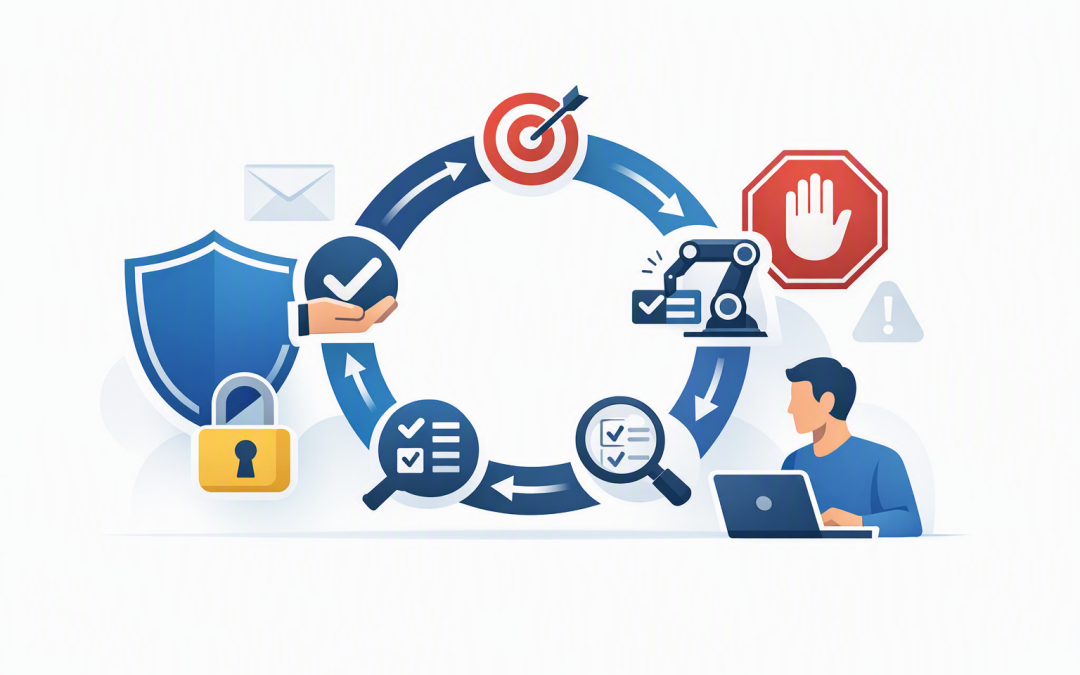
In this blog post Designing Safe AI Agent Loops for Customer Service Operations we will explain how AI agents complete multi-step work, where unsafe loops create business risk, and which controls keep automation within sensible boundaries.
The basic idea is straightforward. An AI agent receives a goal, reviews the available information, chooses an action, checks the result and repeats the process until the work is complete. This repeating cycle is called an agent loop.
The value comes from connecting the agent to business tools. Instead of merely suggesting a reply, it might check an order, update a service ticket, request approval and notify the customer. The danger is that a small misunderstanding can also travel through several systems before anyone notices.
Why a helpful agent can become a business risk
A chatbot normally produces text. An agent can take action.
That difference matters. A poorly controlled customer service agent could issue an incorrect refund, expose another customer’s details or repeatedly call a paid service. An operations agent could update the wrong record, create duplicate orders or continue retrying a failed process for hours.
The answer is not to avoid agents. It is to design the loop so the agent has a clear job, limited authority and reliable stopping points.
Our earlier guide to how the agent loop automates multi-step business processes safely explains the overall model. Here, we will focus on the controls needed in customer service and day-to-day operations.
1. Give the agent a narrow goal and a clear finish line
Broad instructions create unpredictable results. Telling an agent to “solve the customer’s problem” leaves it to decide what solving means, which systems to use and how far it should go.
A safer goal is specific: “Check the order status, explain any delay and draft a response. Escalate the case if the order is more than seven days late.”
Each workflow should define:
- The exact outcome the agent is trying to produce.
- The information it is allowed to use.
- The actions it may take automatically.
- The conditions that require human review.
- The point at which the loop must stop.
This reduces incorrect actions and makes the business outcome measurable. You can track resolution time, escalation rates, customer satisfaction and cost per request instead of simply measuring how many AI conversations occurred.
2. Separate reading information from changing it
An agent that can view an order does not automatically need permission to cancel it. An agent that can draft a refund recommendation does not need authority to send money.
Start with read-only access wherever possible. Add narrowly defined tools for individual actions, such as updating a ticket category or booking an approved delivery window.
This is sometimes called least-privilege access. In plain English, it means giving the agent only the minimum access required to perform its job.
Each agent should also use its own digital identity rather than borrowing an employee’s account. Microsoft Entra can manage these identities and permissions, while Microsoft Defender and Wiz can help security teams identify suspicious activity and risky cloud configurations.
For a closer look at this control, see our guide to designing secure tool use for Claude agents. The same principle applies whether the agent uses Anthropic Claude, OpenAI models or services hosted in Microsoft Azure.
3. Put human approval before consequential actions
Human review should not be added randomly. It should sit immediately before actions that are expensive, sensitive, difficult to reverse or likely to affect a customer.
A customer service agent might be allowed to send a standard delivery update. It should request approval before issuing a large refund, closing a disputed complaint or changing a customer’s payment details.
Operations teams can use a similar risk-based model:
- Low risk: Read records, summarise information and draft responses.
- Medium risk: Update approved fields or send messages from controlled templates.
- High risk: Transfer money, delete data, change access or commit the business to a contract.
The approval screen should show what the agent intends to do, why it selected that action and which records will change. A vague “approve or reject” button is not enough for an informed decision.
4. Treat emails, attachments and websites as untrusted
Customer service agents regularly read emails, uploaded documents and website content. Those sources can contain hidden or misleading instructions designed to manipulate the agent.
This threat is known as prompt injection. It is similar to social engineering for AI: content tells the agent to ignore its real job, reveal protected information or misuse one of its tools.
Filters can help, but they should not be the only defence. Untrusted content should be separated from system instructions, sensitive tools should require policy checks, and high-impact actions should still need approval.
The agent should also verify important facts against trusted business systems. A customer email claiming that a refund was approved is not proof that approval exists in the finance platform.
5. Limit time, cost, retries and the number of steps
Agents need operational limits just as employees need spending limits and approval rules. Without them, a loop can keep retrying a broken action, producing duplicate work and consuming paid AI or software services.
Set a maximum number of steps, a maximum running time and a cost limit for each request. Repeated failures should trigger a circuit breaker, which simply means stopping the workflow and sending it to a person.
Actions should also be designed so retrying them does not create duplicates. For example, the system should recognise that a replacement order has already been created before attempting to create another one.
What a controlled loop looks like
The following simplified example shows the technology behind a safe customer service loop. The AI proposes an action, but ordinary software checks the rules before anything happens.
while task_is_open:
 proposed_action = agent.choose_next_action(context)

 if steps_used >= maximum_steps:
 escalate_to_human("Step limit reached")
 break

 if proposed_action not in approved_tools:
 block_and_log(proposed_action)
 break

 if proposed_action.risk == "high":
 request_human_approval(proposed_action)
 break

 result = run_tool_with_limited_permissions(proposed_action)
 record_action_and_result(result)
 context = update_context(result)

 if success_condition_met(context):
 close_task()
 break
The important point is that the language model does not control the whole process. Standard software enforces permissions, budgets, approvals and stopping rules around it.
6. Control what the agent remembers
Memory can help an agent understand a customer’s history or continue a long-running workflow. It can also retain outdated, incorrect or sensitive information.
Store only the context required for the business task. Apply access controls, retention periods and deletion processes just as you would for information in Microsoft 365 or a customer relationship management system.
This is particularly important in Australia, where personal information handled by AI may fall under the Privacy Act and the Australian Privacy Principles. Sensitive customer information should not be copied into public AI tools without an approved privacy and security assessment.
Our article on building AI agents that remember business context safely covers this area in more detail.
7. Log every decision and test the failures
If an agent changes a customer record, your team should be able to see who requested the work, what information the agent used, which action it proposed, whether approval was provided and what changed.
Logging supports investigations, customer complaints and compliance reviews. It also helps identify wasted effort, recurring failures and opportunities to improve the workflow.
Testing should include more than successful demonstrations. Try missing information, contradictory customer messages, unavailable systems, repeated tool failures, hostile attachments and requests that sit just outside the agent’s authority.
The Australian government’s Essential Eight cybersecurity framework remains relevant here. Restricting administrative privileges, using multi-factor authentication, patching systems and maintaining tested backups will not secure an agent by themselves, but they reduce the damage if an agent or connected system is compromised.
A practical customer service scenario
Consider a 200-person distributor receiving hundreds of delivery enquiries each week. A safe agent could identify the customer, read the order status, check the courier update and prepare a personalised response in seconds.
If the parcel is delayed but still moving, the agent sends an approved update. If it appears lost, involves a valuable order or requires a refund, the loop pauses and presents the case to an employee.
The company reduces repetitive work without allowing the AI to make unlimited financial decisions. Customers receive faster answers, staff spend more time on unusual cases, and management retains a full record of every automated action.
Start with control before adding autonomy
Safe agent loops do not depend on finding a perfect AI model. They depend on well-defined processes, limited permissions, human approval, secure memory, operational limits and useful audit records.
Start with one high-volume workflow and allow the agent to assist before it acts. Measure the results, test the failure cases and gradually increase its authority only when the evidence supports it.
CloudProInc brings more than 20 years of enterprise IT experience to this work, combining practical AI knowledge with Microsoft cloud and Wiz security expertise. As a Melbourne-based Microsoft Partner and Wiz Security Integrator, we help organisations design agent workflows that fit their existing Azure, Microsoft 365, Defender and security environments.
If you are considering customer service or operations agents but are unsure where automation should stop and human approval should begin, we are happy to review the workflow with you — no strings attached.
Discover more from CPI Consulting
Subscribe to get the latest posts sent to your email.