
In this blog post Building Foundry Agent Web Interfaces with AG-UI and ASP.NET Core we will explain how to turn a capable AI agent into a practical application employees can actually use. Many organisations build a promising agent, only to discover that a basic chat box cannot show progress, request approvals or present business data clearly.


AG-UI, short for Agent User Interaction Protocol, addresses the connection between an AI agent and its user interface. It gives the browser and the agent a consistent way to exchange messages, status updates, actions and structured information in real time.
ASP.NET Core provides the secure web application layer, while Microsoft Foundry provides the models, agent services and management capabilities behind the experience. Together, they let organisations move beyond demonstrations and build agent interfaces that fit real business processes.
Why a simple chat window is often not enough
A chat window works well when somebody asks a question and receives a paragraph in return. Business processes are rarely that simple.
An operations agent might need to search several systems, compare records, prepare a recommendation and ask a manager to approve an action. If the interface only displays a loading icon, users cannot tell whether the agent is working, waiting or has failed.
This uncertainty reduces trust. Employees either repeat the request, abandon the tool or return to the manual process the agent was meant to improve.
A useful agent interface should be able to:
- Display answers as they are generated rather than making users wait for the full response.
- Show which stage of a task is currently running.
- Present results as tables, forms, cards or alerts instead of long blocks of text.
- Ask for human approval before making sensitive changes.
- Maintain the current conversation and task state.
- Explain errors in language the user can understand.
These capabilities improve productivity because users spend less time guessing what the system is doing.
What AG-UI does in plain English
AG-UI is the communication agreement between the frontend and the agent. Instead of each development team inventing its own message formats, loading behaviour and approval process, AG-UI defines common event types that both sides understand.
For example, the agent can send a message saying that a run has started, stream sections of its response, report a tool call, request approval and then confirm completion. The web interface listens for those events and updates the screen immediately.
The streaming commonly uses Server-Sent Events, a standard web technique that keeps sending updates from the server to the browser over an open connection. To the employee, this means the application feels responsive rather than frozen.
AG-UI also supports shared state. Shared state is simply structured information that both the browser and the agent can see, such as the fields in an incident form, the stages of a procurement request or the items in a proposed project plan.
How the components fit together
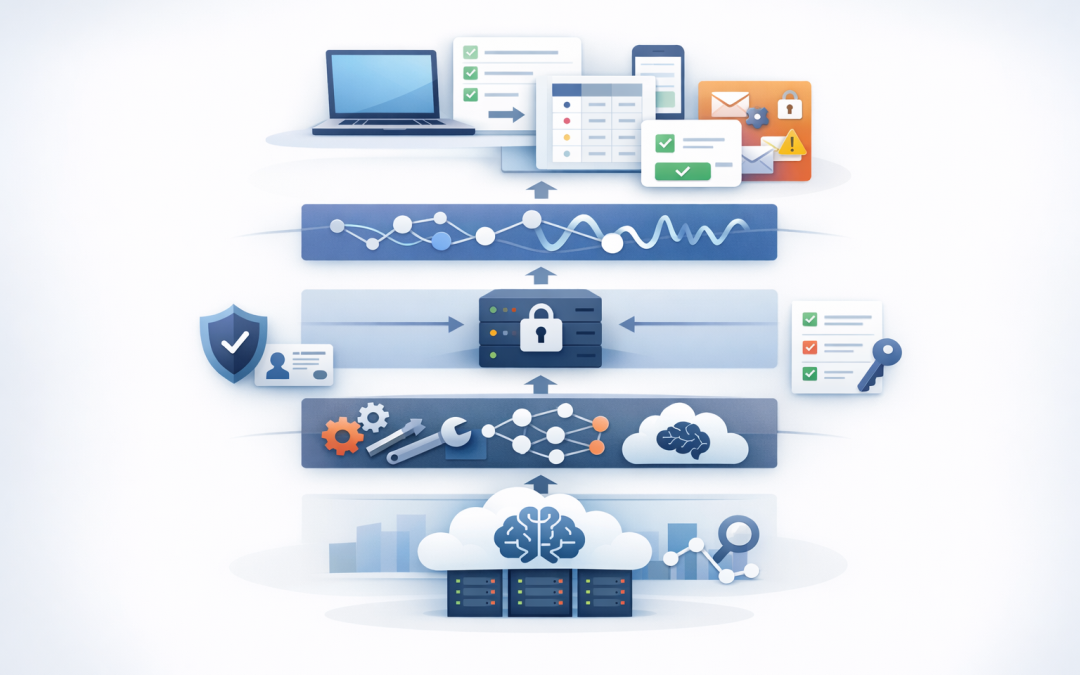
A practical implementation normally has five layers:
- The web interface where the employee enters requests, reviews results and approves actions.
- AG-UI which carries messages, progress updates, tool activity and state between the interface and the agent.
- ASP.NET Core which hosts the endpoint, checks user identity and applies security controls.
- Microsoft Agent Framework which runs the agent logic, tools, instructions and workflow.
- Microsoft Foundry which provides access to the selected AI model and managed agent capabilities.
If your organisation is still designing the agent itself, our guide to building production AI agents with Microsoft Agent Framework and .NET covers that foundation in more detail.
The important design decision is separation. The browser should not connect directly to the AI model, hold cloud credentials or contain sensitive business rules. ASP.NET Core acts as the controlled gateway between employees and the agent.
Creating the ASP.NET Core AG-UI endpoint
The following simplified example shows the basic server pattern. Package versions and preview status can change, so development teams should validate the current Microsoft documentation before locking versions for production.
dotnet add package Microsoft.Agents.AI.Hosting.AGUI.AspNetCore --prerelease
dotnet add package Microsoft.Agents.AI.Foundry --prerelease
dotnet add package Azure.AI.Projects --prerelease
dotnet add package Azure.Identity
The application then registers AG-UI, creates the Foundry-backed agent and maps it to a protected web endpoint.
using Azure.AI.Projects;
using Azure.Identity;
using Microsoft.Agents.AI;
using Microsoft.Agents.AI.Hosting.AGUI.AspNetCore;

var builder = WebApplication.CreateBuilder(args);

builder.Services.AddHttpClient();
builder.Services.AddLogging();
builder.Services.AddAGUI();
builder.Services.AddAuthentication().AddJwtBearer();
builder.Services.AddAuthorization();

var app = builder.Build();

app.UseAuthentication();
app.UseAuthorization();

var projectEndpoint = builder.Configuration["FOUNDRY_PROJECT_ENDPOINT"]
 ?? throw new InvalidOperationException("Foundry endpoint is missing");

var modelName = builder.Configuration["FOUNDRY_MODEL_NAME"]
 ?? throw new InvalidOperationException("Model name is missing");

AIAgent agent = new AIProjectClient(
 new Uri(projectEndpoint),
 new ManagedIdentityCredential())
 .AsAIAgent(
 model: modelName,
 name: "OperationsAssistant",
 instructions: "Help authorised staff review operational requests.");

app.MapAGUI("/api/agents/operations", agent)
 .RequireAuthorization();

app.Run();
AddAGUI registers the services needed to translate agent activity into AG-UI events. MapAGUI exposes the agent through an ASP.NET Core endpoint and handles the streaming response.
Managed identity allows an application hosted in Azure to access approved resources without storing passwords or access keys in source code. Local development may use a developer credential, but production should use a tightly controlled application identity.
Design the interface around decisions, not conversation
The biggest mistake is treating every agent as another version of ChatGPT. The interface should reflect the employee’s job and the decision they need to make.
For an IT support agent, show the affected user, device, risk level and recommended action. For a finance agent, show invoice details, policy exceptions and approval limits. For an operations agent, show task status, dependencies and unresolved issues.
AG-UI can stream structured state and tool activity to these components. A frontend framework can then render that information as familiar business controls rather than exposing raw technical events.
Agents can also receive frontend tools, meaning approved functions that run in the user’s application. These might open a specific record, populate a form or display an approval window. They should be limited to well-defined actions rather than giving the agent unrestricted control of the browser.
Keep people in control of sensitive actions
An agent that can read information creates one level of risk. An agent that can send emails, change records or approve transactions creates another.
AG-UI supports human-in-the-loop workflows, which means the agent pauses and asks a person before completing a sensitive action. The approval screen should clearly show what will happen, which system will be changed and what information will be submitted.
Authentication is only the first control. The application must also confirm what each user is allowed to do. A staff member who can view a customer account should not automatically be allowed to change payment details.
When agents need access to business platforms, use narrowly defined tools and APIs. Our article on connecting Foundry agents to business systems with MCP and OpenAPI explains how to provide that access without giving the model broad system permissions.
If the solution involves agents calling other agents, the same principle applies. Each connection needs its own identity, permissions and audit trail, as discussed in our guide to secure A2A authentication in Microsoft Foundry Agent Service.
A realistic business scenario
Consider a 200-person services company processing operational exceptions through email and spreadsheets. Managers spend several hours each week finding the right records, checking policy and asking staff for missing details.
A Foundry agent could collect the relevant information and prepare a recommendation. AG-UI could show progress as systems are checked, populate a structured review screen and request approval before updating the source system.
The business outcome is not simply “having an AI chatbot.” It is fewer manual checks, faster decisions, clearer accountability and a reliable record of who approved each action.
Plan for production from the beginning
Before releasing an AG-UI interface, confirm that the solution includes:
- Microsoft Entra ID sign-in and role-based access.
- Server-side validation for every tool and requested action.
- Human approval for high-impact or irreversible changes.
- Logging that records actions without unnecessarily storing sensitive prompts.
- Rate limits and spending controls to prevent unexpected AI costs.
- Clear error messages and a manual fallback process.
- Testing against prompt manipulation and unauthorised data access.
- Patch management and application controls aligned with Essential 8, the Australian government’s cybersecurity framework that many organisations use to reduce common cyber risks.
AG-UI is still developing, so isolate protocol-specific code and test upgrades before deployment. This reduces the cost of future changes and prevents the interface from being tied too closely to one package version.
Start with one valuable workflow
The strongest first project is usually a repetitive process with clear inputs, measurable delays and an obvious approval point. Avoid beginning with an agent that is expected to do everything for everyone.
CloudProInc brings more than 20 years of enterprise IT experience to these decisions. As a Melbourne-based Microsoft Partner and Wiz Security Integrator, we help organisations across Australia and internationally connect Foundry, Azure, Microsoft 365 and security controls without turning a useful AI project into another unmanaged risk.
If you have a Foundry agent but are not sure how to turn it into a secure, practical web application, we are happy to review the design and identify the simplest path forward — no strings attached.
Discover more from CPI Consulting
Subscribe to get the latest posts sent to your email.