
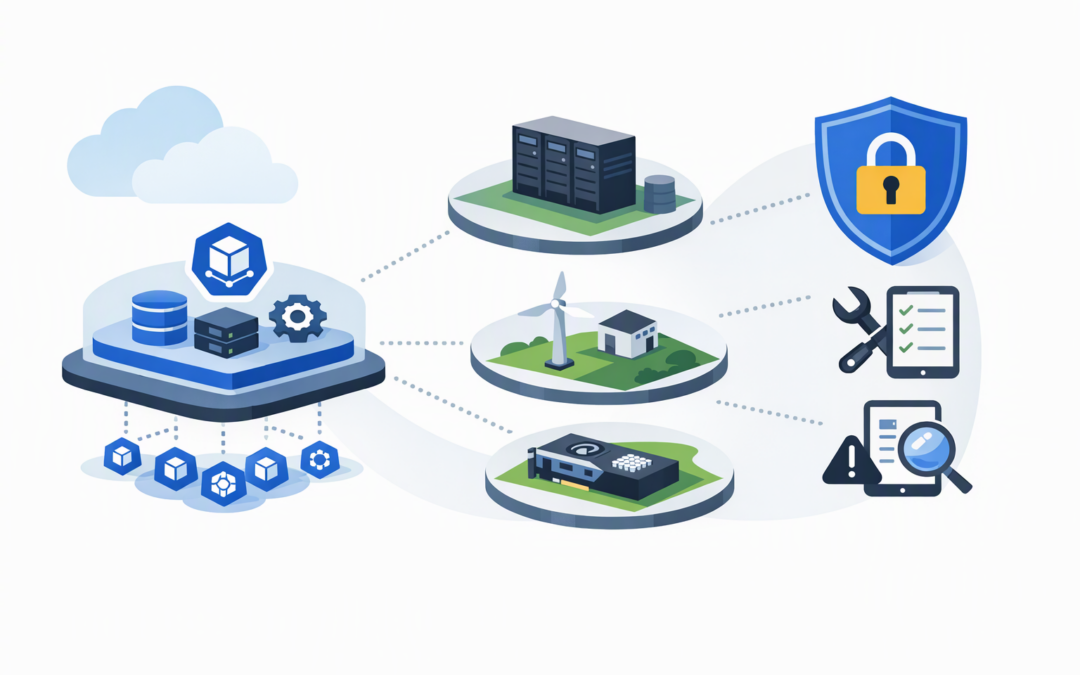
In this blog post How AKS Flex Nodes Extend Azure Clusters to Your Own Compute we will explain how Microsoft’s new approach lets organisations use their own servers as part of an Azure Kubernetes Service cluster—and why that flexibility needs careful governance.
Many businesses have valuable computing capacity sitting outside Azure. It may be in a Melbourne data centre, another cloud, an edge location or a specialist server fitted with expensive AI processors. Until now, using that capacity often meant operating a separate Kubernetes environment, with another control plane, another security model and another set of management tools.
AKS Flex Nodes are designed to reduce that duplication. They let selected external machines join an existing Azure Kubernetes Service cluster as worker nodes, while the main cluster management layer remains in Azure.
What are AKS Flex Nodes?
Azure Kubernetes Service, or AKS, is Microsoft’s managed platform for running applications packaged into containers. Containers bundle an application with what it needs to run, making it easier to move and operate consistently across different environments.
CPI Consulting helps organisations design, build and secure Azure AI solutions, from Azure OpenAI and Microsoft Foundry to agents, governance and production deployment.
Visit CPI ConsultingAn AKS cluster has two main parts. The control plane decides where applications should run and monitors their health. Worker nodes are the virtual machines that provide the processor, memory and storage needed to run them.
Standard AKS worker nodes are normally created and managed inside Azure. Flex Nodes allow the cluster to use customer-managed Linux machines instead. These can include Azure virtual machines that AKS did not create, on-premises servers, bare-metal hardware or machines in another location.
The business benefit is straightforward: you can potentially use existing or specialised capacity without building another Kubernetes cluster around it.
How the technology works behind the scenes
A Flex Node agent is installed on each external host. This agent prepares an isolated Kubernetes worker environment, connects it securely to AKS and keeps its configuration aligned with the settings requested through Azure.
The isolation layer uses systemd-nspawn, which creates a controlled environment for the Kubernetes components on the host. In plain English, AKS can update and manage the worker-node environment without taking ownership of, or replacing, the underlying server.
Azure also creates a Machine resource for each connected host. This records the node’s intended configuration and Kubernetes version. The physical machine remains yours, but AKS gains a management record for the Kubernetes environment running on it.
Once connected, applications can be directed to Flex Nodes using labels and placement rules. This means an AI workload could run on a server with a particular graphics processor, while ordinary web services stay on standard Azure node pools.
Where Flex Nodes could deliver business value
1. Reuse computing capacity you already own
Some organisations have recently purchased servers that still have years of useful life. Others have private-cloud capacity committed under long-term contracts.
Flex Nodes could allow suitable machines to support an AKS environment rather than leaving them underused or paying for equivalent Azure capacity. However, the calculation must include power, support, networking and maintenance—not just the apparent saving on cloud compute.
2. Use specialist hardware without moving everything
AI, engineering and analytics workloads sometimes require specialised processors that are expensive or difficult to obtain in a particular Azure region. Flex Nodes can make that hardware available to an AKS cluster while keeping general workloads on conventional Azure infrastructure.
This could be useful for organisations taking the next step after experimenting with smaller models such as those discussed in our guide to Azure Phi-3. It provides another option for running selected AI processing without redesigning the whole application platform.
3. Process data closer to where it is created
A manufacturer may need to analyse camera or sensor data inside a factory rather than sending every file to Azure first. A retailer may want local processing in a distribution centre so operations can continue when internet connectivity is limited.
A Flex Node at that location could run the local component while remaining part of the broader AKS operating model. This may reduce delays and bandwidth costs, but it does not automatically make an application offline-capable. The application must still be designed for interrupted connectivity.
4. Reduce the number of separate platforms
Without Flex Nodes, teams may operate one Kubernetes cluster in Azure, another on-premises and perhaps a third near specialist hardware. Each environment needs patching, monitoring, access controls and upgrade planning.
A shared control plane may reduce some of this operational duplication. It can also help platform teams apply more consistent deployment practices as AI projects move from experiments into production services, an issue explored in moving AI proofs of concept into production.
A practical business scenario
Consider a 200-person Australian manufacturer with an AKS-based application in Azure and several powerful servers at its production site. Those local servers process equipment data, but the IT team maintains a separate Kubernetes environment for them.
Flex Nodes could allow selected factory servers to join the Azure cluster. The company might then manage application placement and Kubernetes versions through a more consistent process, while keeping time-sensitive processing close to the machinery.
The outcome could be fewer management systems and better use of existing hardware. The trade-off is that the company remains responsible for the servers, their operating system, network links and physical security.
What Flex Nodes do not manage for you
Flex Nodes are not the same as handing your servers over to Microsoft. AKS manages the cluster control plane and the Flex Node integration, but your team still owns several critical areas:
- The host operating system: You must patch, harden and monitor the Linux machine.
- Network connectivity: The host, applications and AKS control plane need secure and reliable communication.
- Identity: Each host needs an approved Azure identity, such as a managed identity or an identity provided through Azure Arc.
- Physical hardware: Failed disks, processors and network interfaces remain your responsibility.
- Workload security: Container images, application permissions and stored secrets still require governance.
Networking deserves particular attention. During the preview, organisations provide the connectivity between locations. Microsoft’s documented approach uses Unbounded-Net, a networking layer that connects applications across the participating sites. Existing AKS networking features do not simply extend themselves to an external server.
How workloads are placed on Flex Nodes
After a node is connected and reports as ready, your platform team can check its pool and type with a command such as:
kubectl get nodes \
 -L kubernetes.azure.com/agentpool,kubernetes.azure.com/nodepool-type
A workload can then include a placement rule similar to this:
spec:
 template:
 spec:
 nodeSelector:
 kubernetes.azure.com/agentpool: edgepool
This example tells Kubernetes to place the application on nodes belonging to the named pool. In a real environment, CloudProInc would normally recommend additional restrictions so ordinary applications cannot accidentally consume specialist or edge capacity.
The security and compliance questions to ask
Extending a cluster across locations also extends its security boundary. A compromised external host could create risk for workloads, identities and connected networks.
Australian organisations should assess the design against the Essential Eight—the Australian Government’s cybersecurity framework—including patching, administrative access, application control and multi-factor authentication. Microsoft Defender and Wiz can add visibility, but neither replaces secure host configuration and clear operational ownership.
Ingress controls also remain important because connecting compute does not secure the applications exposed through the cluster. Platform owners should coordinate this work with their existing AKS ingress security and upgrade planning.
Should you use AKS Flex Nodes now?
AKS Flex Nodes are currently a public preview. Microsoft has introduced guided Azure portal onboarding for supported Azure virtual machines and Azure Arc-enabled servers, but the feature still has preview support conditions and is not recommended for production workloads.
For most organisations, the right first step is a controlled evaluation using non-critical workloads. Test network behaviour, upgrades, node failures, security monitoring and removal procedures before calculating any expected saving.
- Identify a workload with a genuine location or hardware requirement.
- Confirm that existing hardware is suitable and supportable.
- Model the full operating cost, including network and staff time.
- Define who patches and monitors every layer.
- Test failure scenarios before considering production use.
Flexibility is useful only when responsibility is clear
AKS Flex Nodes could give businesses a practical middle ground between an Azure-only cluster and multiple independently managed platforms. The strongest use cases involve specialised hardware, edge processing or existing capacity with a clear financial value.
The feature does not remove infrastructure responsibility. It changes where that responsibility sits, so cost, security and support boundaries should be documented before a host joins the cluster.
CloudProInc combines more than 20 years of enterprise IT experience with hands-on Azure, AKS, Microsoft Defender and Wiz security expertise. If you are considering Flex Nodes—or are unsure whether your current Kubernetes footprint is costing more than it should—we are happy to review the design with you, with no strings attached.