
In this blog post Reliable Azure Document Workflows with Confidence and Human Review we will explain how to automate document processing without allowing uncertain AI results to quietly enter your finance, legal or operational systems.
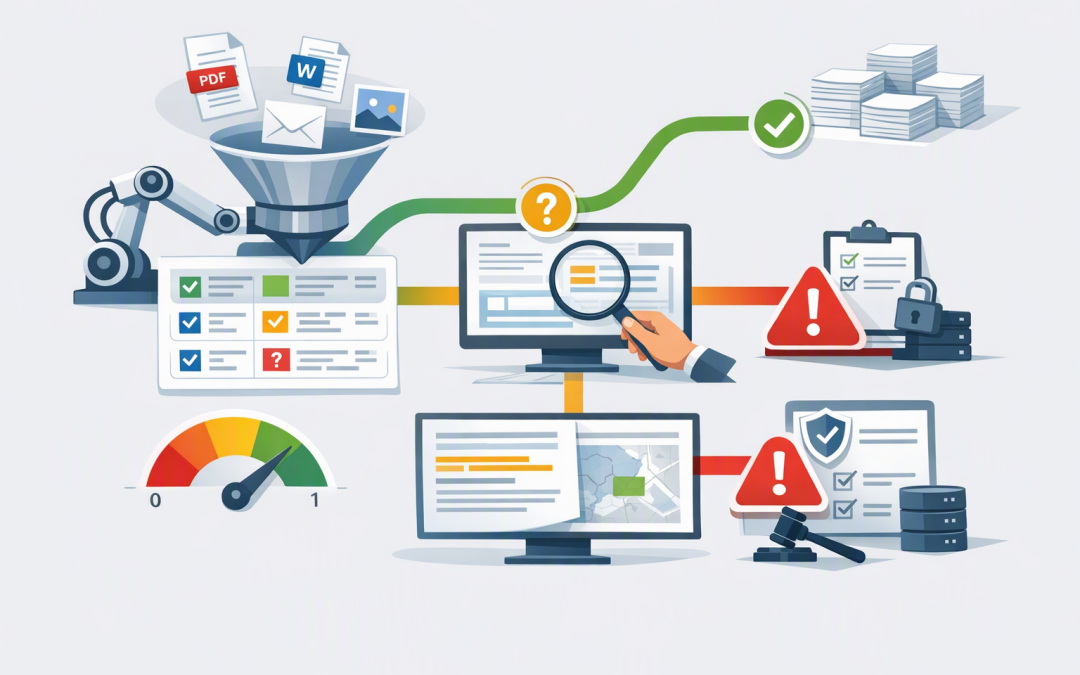
The basic idea is simple. Azure Content Understanding reads documents, converts important information into structured data and provides evidence about where that information came from. Your workflow can then approve reliable results, send uncertain fields to a person or stop documents that do not meet your rules.
This matters because the biggest risk in document automation is not an obvious failure. It is a believable mistake that moves through the business unnoticed.
Why document automation often becomes unreliable
Most organisations begin with a straightforward goal: reduce the time employees spend reading invoices, contracts, purchase orders, claims or application forms.
The first demonstration usually looks impressive. The AI finds supplier names, dates, totals and contract terms within seconds.
Problems appear when real documents arrive. Pages are scanned badly, suppliers change their layouts, handwritten notes cover important fields and similar labels mean different things in different documents.
If every result is automatically accepted, one incorrect bank account, renewal date or invoice total can create a much larger problem. If employees must check every result, the organisation has simply replaced manual data entry with manual AI supervision.
A reliable workflow sits between these extremes. It automates routine documents while directing human attention towards the exceptions that carry genuine business risk.
How Azure Content Understanding works
Azure Content Understanding is a Microsoft cloud service that analyses documents and turns their contents into organised, machine-readable information. It can work with files such as PDFs, Microsoft Word documents, spreadsheets, emails and scanned images.
You configure an analyser, which is simply a reusable set of instructions describing what the business needs from a document. For an invoice, this might include the supplier, invoice number, purchase order, payment details, line items, tax and total amount.
Each field can use one of three approaches:
- Extract information that appears directly in the document, such as an invoice date.
- Classify the document or field into an approved category, such as contract, invoice or purchase order.
- Generate an answer that requires interpretation, such as a summary of a termination clause.
The field definitions matter. Clear descriptions, expected formats and alternative labels help the analyser understand what the business means rather than merely looking for matching words.
Grounding shows reviewers where the answer came from
Grounding links an extracted or generated result back to supporting content in the original document. Depending on the document and field, the output can identify the relevant page and region.
This means a reviewer does not need to search through a 70-page contract to check a renewal date. The review application can open the correct page and highlight the supporting text.
Grounding is especially important when documents affect payments, customer outcomes, legal obligations or regulatory reporting. It creates a visible chain between the original file, the AI result and the final human or automated decision.
We covered the trust principles in more detail in how Azure document AI earns trust with confidence and grounding. The next step is using that evidence to control an end-to-end workflow.
Confidence determines what happens next
A confidence score is an estimate between zero and one showing how certain the analyser is about a result. It is not a guarantee that the answer is correct, but it gives the workflow a useful signal for deciding how much checking is required.
A practical workflow normally has three paths:
- Proceed automatically. Required fields are present, confidence is strong, grounding is available and business validation rules pass.
- Request targeted review. One or two fields are uncertain, so a person checks only those fields rather than reprocessing the entire document.
- Stop and escalate. The document is incomplete, unsupported, potentially duplicated or fails an important business rule.
The logic might look like this:
IF required payment details are missing
 Stop and escalate
ELSE IF invoice total confidence is below the approved threshold
 Send the total and supporting page to a reviewer
ELSE IF purchase order and invoice totals do not match
 Send the mismatch to accounts payable
ELSE
 Continue to the finance system
The technology identifies the evidence and uncertainty. Your business rules decide what level of risk is acceptable.
Do not use one confidence threshold for everything
A common mistake is selecting one number, such as 90%, and applying it to every document and field.
The correct threshold depends on the consequence of an error. An uncertain internal reference may have little impact. An uncertain bank account, contract expiry date or payment total needs much stricter treatment.
Set thresholds using four factors:
- Field importance: What happens if this specific value is wrong?
- Transaction value: Should a $300 invoice follow the same path as a $300,000 invoice?
- Document quality: Are scans, handwriting or unusual layouts common?
- Historical performance: Which suppliers, document types and fields regularly require correction?
Test these rules against a representative set of real business documents. Averages can hide serious weaknesses, so measure performance for critical fields and difficult document types separately.
If the organisation is still proving the concept, our 30-day secure Azure Content Understanding pilot provides a practical starting structure.
Make human review fast and measurable
Human review should not mean emailing a PDF to a shared mailbox and waiting for someone to investigate.
A useful review screen should show the original document, highlight the supporting evidence and display only the fields requiring attention. The reviewer should be able to correct a value, approve it or reject the document with a reason.
Record the original AI result, confidence score, source location, reviewer change, reviewer identity and time of the decision. This audit trail supports internal investigations and demonstrates that automation is being actively controlled.
Corrections should also be analysed over time. If the same supplier layout or contract clause repeatedly creates low-confidence results, the analyser instructions or labelled examples can be improved instead of permanently accepting extra manual work. Microsoft supports labelled samples to help analysers adapt to relevant layouts, terminology and edge cases.
What the business outcome can look like
Consider an illustrative accounts payable team receiving 1,200 documents each month. At five minutes per document, full manual processing consumes around 100 hours.
After testing, suppose 70% can proceed automatically, 25% need a two-minute targeted review and 5% require an eight-minute specialist review. Monthly handling falls to approximately 18 hours.
That is an estimated saving of 82 hours each month, while the highest-risk exceptions still receive human attention. The actual result should always be confirmed through a pilot using your own documents, rules and labour costs.
Security and compliance still need deliberate design
Document AI does not become compliant simply because it runs in Azure. Access controls, data retention, encryption, monitoring and separation of duties still need to match the sensitivity of the information being processed.
For Australian organisations, the workflow should support broader controls under the Essential Eight, the Australian Government’s cybersecurity framework, as well as applicable privacy and record-keeping obligations. It should also limit reviewers to documents they are authorised to see.
The resulting structured information can later support search tools and AI assistants. Our article on making document data agent-ready explains how to prepare for that next stage without creating another uncontrolled data store.
Build reliability before chasing automation percentages
The best document workflow is not the one that removes the most people from the process. It is the one that automatically handles safe, repeatable work and makes risky exceptions easier for people to resolve.
Start with a narrow document type, define the business consequence of each field, test confidence thresholds and make grounding visible to reviewers. Then monitor corrections and expand only when the evidence supports it.
CloudProInc brings more than 20 years of enterprise IT experience to this work as a Microsoft Partner and Wiz Security Integrator. Our Melbourne-based team helps organisations across Australia and internationally design practical Azure, AI and security solutions without the overhead of a large, faceless provider.
If you are not sure whether your proposed document workflow is safe enough to automate or too cautious to deliver savings, we are happy to review the design with you — no strings attached.