
Most Microsoft 365 environments are deployed for productivity first and secured later, if at all.


That is how many Australian businesses end up with the appearance of control without the substance of it. Email works. Teams works. Files sync. Staff can work from anywhere. But the tenant still has weak admin hygiene, unmanaged devices, loose sharing, and no clear path to an Essential Eight-aligned baseline.
That gap matters. A basic Microsoft 365 setup is enough to run the business. It is not enough to defend it.
What Basic Setup Usually Looks Like
When we review Microsoft 365 environments for mid-market organisations, the same pattern shows up repeatedly.
The tenant has mail flow configured, users are licensed, and Multi-Factor Authentication may be enabled for some or all staff. Beyond that, security controls are often inconsistent. Conditional Access is missing or too broad. Intune is either not deployed or only half configured. SharePoint and OneDrive sharing settings are still close to default. Administrator accounts have more access than they need.
None of that looks dramatic day to day. It only becomes urgent after a phishing incident, a device compromise, or an external party asks harder questions about security posture.
The Shift Starts With Identity, Not Just Licensing
The first move from basic setup to a secure workplace is treating identity as the control plane.
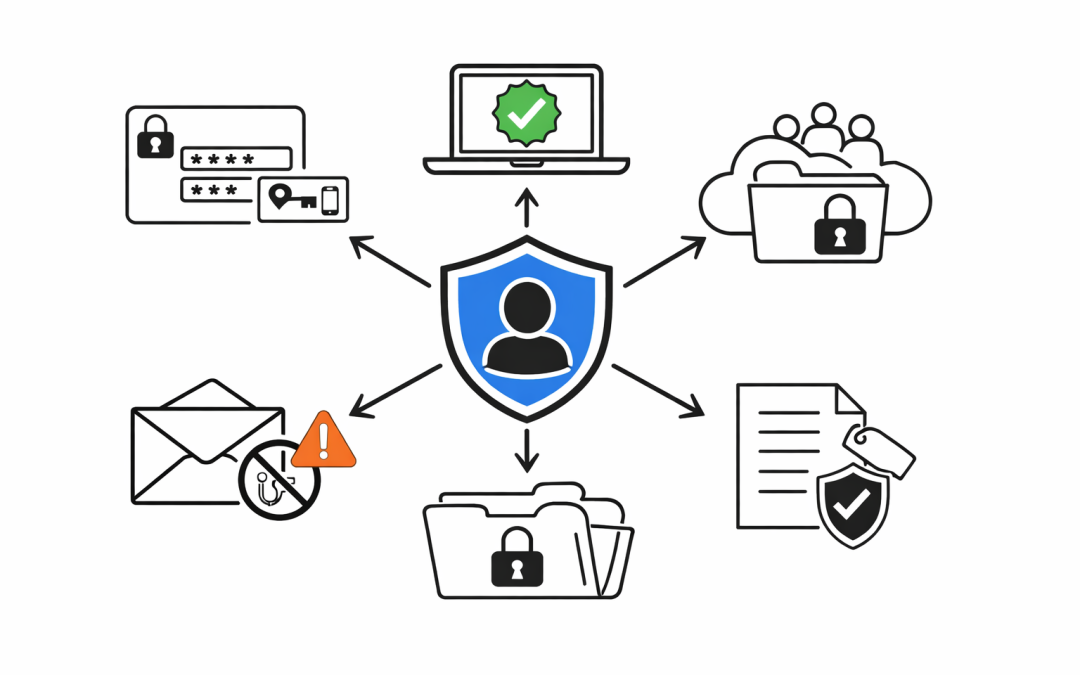
That means enforcing Multi-Factor Authentication for every user, but it also means going further. Microsoft Entra Conditional Access should be used to block legacy authentication, require stronger sign-in controls for privileged roles, and limit access from unmanaged or non-compliant devices. For higher-risk users, phishing-resistant methods should be part of the roadmap rather than an afterthought.
This lines up with the ACSC's Essential Eight approach as well. MFA is one control, not the whole security strategy. A secure workplace needs layered controls around authentication, privilege, and access decisions.
Devices Need to Earn Access
One of the biggest weaknesses in a basic Microsoft 365 setup is the assumption that a valid login is enough.
It is not. If staff can access company email and files from unencrypted personal laptops, outdated mobile devices, or endpoints with no compliance controls, the organisation has expanded risk without realising it.
Microsoft Intune changes that by making device posture part of the access decision. A proper secure workplace uses Intune to enforce baseline controls such as encryption, screen lock, patch currency, and endpoint protection status. Conditional Access can then allow access only from devices that meet those requirements.
That is a major step up from basic setup because it shifts control from trust-by-default to verify-before-access.
Email and Collaboration Need Active Protection
For most organisations, email is still the main attack path.
That is why moving to a secure workplace means enabling the controls that sit between staff and modern phishing campaigns. Microsoft Defender for Office 365 adds Safe Links, Safe Attachments, anti-phishing policies, and impersonation protection. These controls matter because many successful attacks no longer depend on guessing passwords. They depend on convincing users to click, open, approve, or trust.
Collaboration platforms need the same attention. SharePoint, OneDrive, and Teams sharing settings should be reviewed deliberately, not inherited from whatever was enabled on day one. External sharing, anonymous links, and long-lived guest access are common sources of exposure in otherwise well-run tenants.
Sensitive Data Cannot Be Left to Good Intentions
A proper secure workplace does not rely on staff remembering what should and should not be shared.
It uses Microsoft Purview to apply structure. Sensitivity labels, data loss prevention policies, and clearer data handling rules help reduce the chance that customer records, financial data, HR files, or board documents leave the business through routine mistakes.
This is also where many organisations begin to see the difference between a functioning Microsoft 365 tenant and a governed one. The tools may already be included in the licence stack, but until they are configured around business data, the organisation is still operating on trust rather than control.
Secure Workplace Means Operational Discipline
Security posture is not created by a one-off project.
The Essential Eight maturity model makes that clear. Organisations need a target maturity level, a risk-based implementation plan, and consistent progress across the control set rather than isolated improvements in one area. Microsoft 365 can support a large part of that journey, but only if the environment is maintained with discipline.
That includes regular access reviews, tighter admin role assignment, tested backup and recovery arrangements, patching visibility, alerting, and routine review of Secure Score and audit data. The goal is not to switch on every control in the portal. The goal is to make sure the workplace remains secure as staff, devices, and business processes change.
What This Looks Like in Practice
In practical terms, moving from basic setup to a secure workplace usually means progressing through a clear sequence:
- Standardise MFA and remove weak sign-in paths.
- Build Conditional Access around user risk, device trust, and admin protection.
- Enrol and manage endpoints through Intune.
- Strengthen email and collaboration protections with Defender for Office 365.
- Apply Purview controls to the data that matters most.
- Review admin privileges, sharing, backups, and monitoring as ongoing operational controls.
That sequence is far more effective than buying extra tools before the Microsoft 365 foundation is under control.
The Real Goal
The real goal is not to make Microsoft 365 look more secure in a dashboard.
It is to create a secure workplace where identity is controlled, devices are trusted, data is governed, and the business can keep operating when threats appear. For Australian organisations, that also means being able to show clients, insurers, regulators, and boards that security is being managed systematically rather than reactively.
If your Microsoft 365 environment still reflects a quick setup rather than a deliberate security architecture, it is worth reviewing the gap now. Our team helps organisations turn basic Microsoft 365 deployments into a secure workplace with practical controls, clear priorities, and an approach aligned to real business risk.