
In this blog post How AI Agents Will Reshape Enterprise IT Over the Next 3 Years we will explain what AI agents are, how the technology works in plain English, and what practical changes CIOs, CTOs, and IT managers should prepare for.


Most mid-sized IT teams are already stretched. Tickets pile up, onboarding is manual, reporting takes too long, and security alerts are noisy. That is why AI agents matter. They are not just smarter chatbots. They are software assistants that can understand a request, look up the right information, use approved tools, take a limited action, and tell a human what happened.
Based on the direction of Microsoft, OpenAI, and Anthropic platforms, the next phase of AI in business will be less about asking questions in a chat window and more about agents working behind the scenes across your service desk, Microsoft 365, cloud platform, device fleet, and security stack. Microsoft has already moved enterprise agent capabilities forward through Azure AI Foundry Agent Service and Copilot Studio, while OpenAI and Anthropic have both expanded the building blocks that let agents use tools, connect to business data, and hand work to specialised agents.
What an AI agent actually is
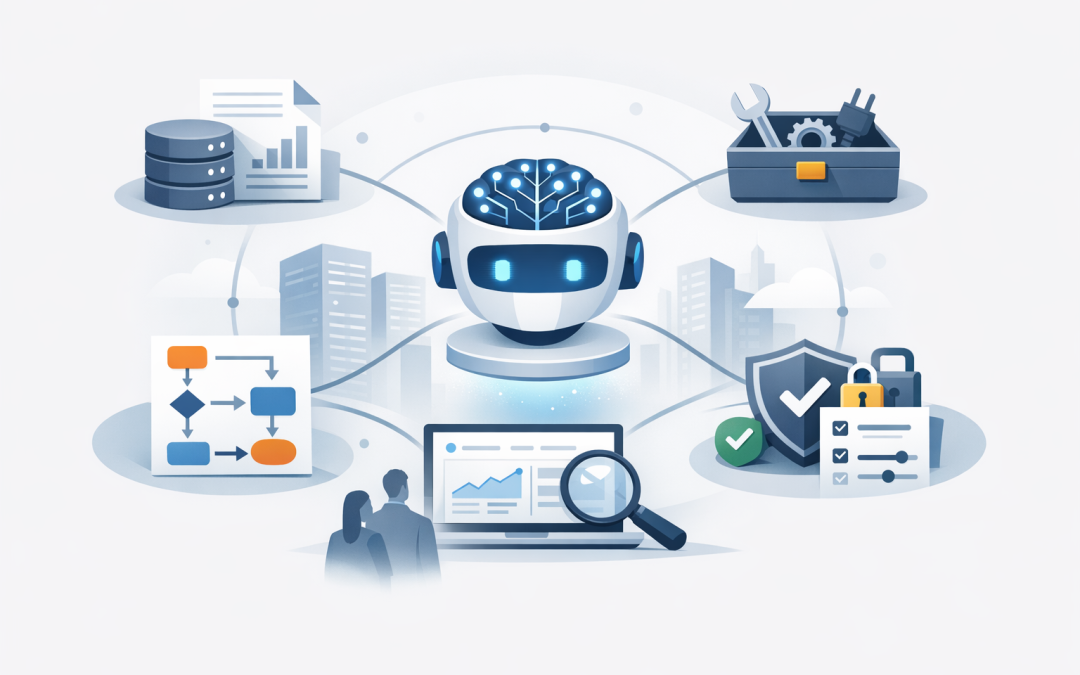
At a high level, an AI agent is a combination of five things. First, it has a large language model, which is the reasoning engine that understands requests and produces responses. Second, it has business context, meaning access to the right emails, files, policies, tickets, or records. Third, it has tools and connectors, so it can do more than talk. Fourth, it has workflow logic, which tells it what steps to follow. Fifth, it has guardrails, meaning permissions, logging, approvals, and security controls that limit what it can do.
- The model is the brain.
- The connector is the bridge into your systems.
- The workflow is the process map.
- The guardrails are the rules that keep it safe.
In Microsoft 365, this is already quite visible. Microsoft describes Microsoft 365 Copilot as an orchestration engine that combines large language models with Microsoft Graph, which is the layer that understands which emails, files, meetings, and chats each user already has permission to access, along with the Microsoft apps people use every day. Microsoft also states that prompts, responses, and data accessed through Microsoft Graph are not used to train the foundation models behind Microsoft 365 Copilot.
Another technology worth knowing is MCP, short for Model Context Protocol. In plain English, it is an open standard for connecting AI systems to the places where data lives, without building a separate one-off connection for every tool. That matters because the businesses that get value from AI agents will be the ones that can connect those agents safely to service desks, document libraries, security tools, CRM systems, finance systems, and internal knowledge bases.
The important shift is this. Instead of only generating text, agents can now do work. They can read a ticket, search a policy, check a user record, draft a response, trigger an approval, pass the task to another agent, and keep a trace of what happened for review later.
How enterprise IT operations will change over the next three years
1. The service desk will become a triage and resolution engine
Today, many IT teams still spend too much time on repetitive work such as password resets, access questions, software requests, device troubleshooting, and onboarding tasks. Over the next three years, expect AI agents to handle the first layer of that work: classifying requests, gathering missing details, searching the right knowledge, drafting responses, and in some cases completing low-risk actions automatically. Human technicians will spend less time routing tickets and more time solving exceptions, improving service quality, and managing change. That is an inference based on current agent tooling, multi-step workflows, and multi-agent orchestration now becoming mainstream in enterprise platforms.
The business outcome is straightforward. Faster response times, lower support cost per ticket, and less frustration for staff who just want to get back to work.
2. Device and identity management will become more self-healing
If you use Microsoft Intune, which manages and secures all your company devices, or Windows 365, which provides cloud PCs employees can access from anywhere, agents will increasingly watch for failures, detect policy drift, and trigger pre-approved fixes. In plain English, instead of waiting for a person to notice that a laptop is missing encryption, a new starter has the wrong apps, or a compliance policy has failed, the system will catch it, explain the issue, and suggest or run the fix. Current Microsoft agent platforms are already moving toward governed actions, runtime protection, visibility, and environment-level controls for production use.
For a business with 100 to 500 staff, that means fewer manual checks, smoother onboarding, and less time lost to avoidable device and access issues.
3. Security operations will get faster, but governance will matter more
This is the area where leaders should be both excited and careful. Agents can help summarise incidents, correlate alerts, investigate suspicious changes, and reduce the time analysts spend jumping between tools. But an agent with access to email, files, identity systems, or cloud settings can also create risk if permissions are sloppy or if the system can be tricked by malicious instructions. That is why Microsoft has been adding data policies, audit logs, monitoring, runtime protections, and protections against prompt injection and jailbreak-style attacks for enterprise agents. Prompt injection simply means someone tries to manipulate the agent with hidden or malicious instructions.
For Australian organisations, this sits directly alongside Essential Eight, the Australian Government’s cybersecurity framework that many organisations now use to reduce attack risk, as well as privacy obligations under the Privacy Act. The OAIC has been clear that businesses should be cautious about entering personal information, especially sensitive information, into publicly available generative AI tools. In practice, that means enterprise-grade controls, approved data boundaries, and clear governance are not nice-to-haves. They are part of the project from day one.
4. IT reporting and knowledge work will stop being so manual
Many IT managers still spend hours each month turning raw system data into board updates, risk summaries, licence reviews, asset reports, and project status notes. Agents are well suited to this because the work follows a pattern: collect data, check permissions, compare it against rules, summarise the result, and present it in business language. In Microsoft’s ecosystem, that becomes much more practical because Microsoft 365 Copilot and related controls can inherit existing permissions, sensitivity labels, retention policies, and auditing, while Microsoft guidance also focuses on reducing oversharing and stale content so AI responses stay useful and safe.
The business outcome here is not just time saved. It is better decision-making. When leaders get clearer reporting faster, they can act earlier on security gaps, licence waste, project delays, and compliance issues.
5. One agent will not run everything
Over the next three years, the more likely model is a small team of specialised agents rather than one all-knowing system. Microsoft now supports multi-agent orchestration, and OpenAI’s agent tooling is designed around specialised agents handing work to other agents and keeping a trace of what happened. That matters because enterprise IT is made up of very different jobs: service desk, onboarding, patching, compliance evidence, cloud cost reviews, and security investigation all need different rules, data access, and approval paths.
That is also good news for decision-makers. You do not need to bet the business on one giant AI rollout. You can start with one narrow use case, prove the return, and expand from there.
A practical scenario for a 200-person business
Picture a Melbourne-based professional services firm with 200 staff, a lean internal IT team, Microsoft 365, Azure, Intune, and a handful of business applications. On Monday morning, a new employee starts, two laptops fail compliance checks, one executive reports suspicious email activity, and finance wants a list of unused software licences before month end.
Today, that often means four separate queues, several admin consoles, and a lot of follow-up. Over the next few years, a well-governed agent setup could read the onboarding request, verify the approved role, prepare the right access pack, open device setup tasks, draft a manager approval, flag the risky sign-in for review, and prepare a licence optimisation report. The IT manager still stays in control, but far less time is spent copying information between systems.
The business outcome is simple. Faster onboarding, fewer missed security steps, lower licence waste, and more time for your IT team to work on projects that actually move the business forward.
What most companies will get wrong
- They will start with a flashy demo instead of a costly process. The better starting point is a repetitive workflow that already has clear rules and a measurable cost.
- They will give the agent too much access. Good agent design follows least-privilege access, approvals, logging, and clear boundaries.
- They will ignore data quality. If your SharePoint, Teams, or knowledge base is a mess, the agent will surface that mess faster.
- They will treat governance as paperwork. In reality, governance is what makes agents safe enough for real business use.
What to do now
- Pick one IT process that is high volume, repetitive, and low risk.
- Map the systems, approvals, and data that process touches.
- Clean up permissions and overshared content before you automate.
- Set rules for human approval, logging, and exception handling.
- Run a controlled pilot with a defined business metric, such as ticket response time, onboarding time, or licence savings.
That is the approach we see working best in the real world. Businesses do not need an AI strategy slide deck first. They need one useful, governed outcome that saves time or reduces risk.
The bottom line
AI agents will not replace enterprise IT teams over the next three years. They will replace a lot of the manual coordination, repetitive checking, and swivel-chair work that drains those teams today. The winners will be the businesses that treat agents like part of their operating model, with security, governance, and business ownership built in from the start.
As a Melbourne-based Microsoft Partner and Wiz Security Integrator with more than 20 years of enterprise IT experience, CloudPro Inc works hands-on across Azure, Microsoft 365, Intune, Windows 365, Defender, Wiz, and enterprise AI platforms. If you are not sure whether AI agents could reduce workload, tighten security, or improve service levels in your environment, we are happy to take a look – no strings attached.
Discover more from CPI Consulting
Subscribe to get the latest posts sent to your email.